
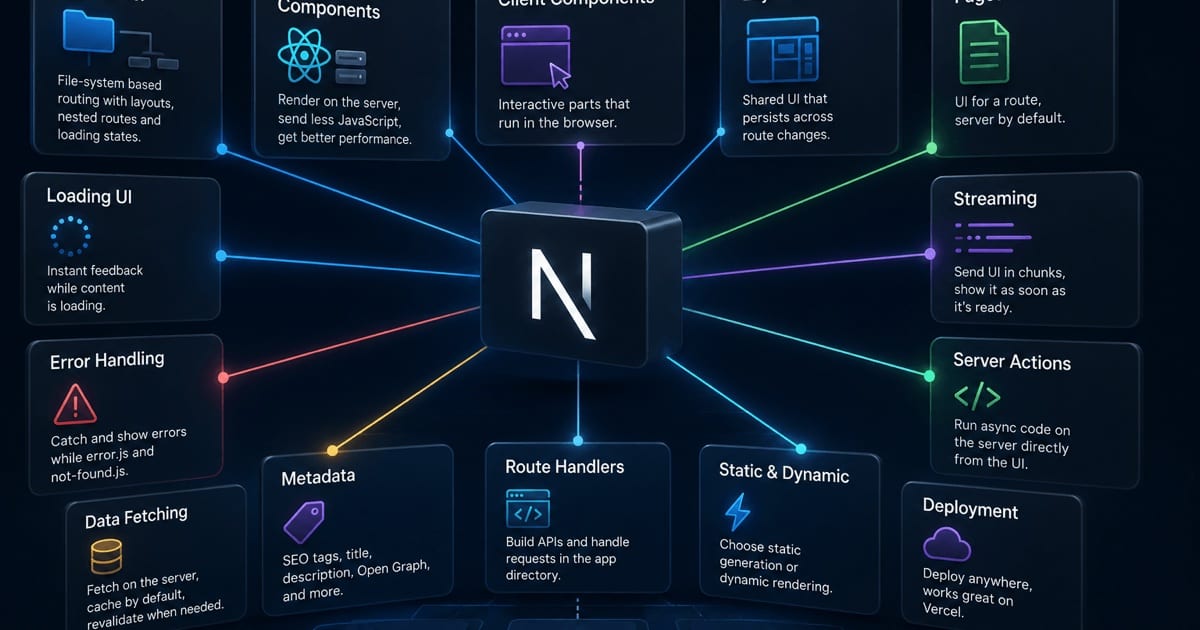
A one-line-per-concept tour of Next.js — the whole mental model at a glance, from routing to rendering to deployment, with no fluff.
A no-fluff map of everything Next.js is built on. Each concept gets a one-line definition to place it, plus a sentence on why it matters — enough to hold the whole model in your head. An appendix at the end collects the more advanced ideas worth exploring next.
Routing & Structure
File-system routing
Folders and files inside app/ become URLs — there's no separate route configuration to keep in sync. The shape of your directory tree is the shape of your site: to add /dashboard/settings, you create that folder path and drop a page file in it. Because routing is driven by convention, a new engineer can look at the file tree and immediately know every URL the app serves.
App Router vs Pages Router
app/ is the modern, React-Server-Component-first router; pages/ is the original, still-supported system. New projects should start in app/ to get Server Components, streaming, and nested layouts, while pages/ remains a mature, well-documented option. The two can even coexist in one project during a migration, though they use different data-fetching and rendering models, so it's worth understanding both before you mix them.
Dynamic & catch-all routes
Square brackets turn a segment into a parameter: [id] matches exactly one segment (/posts/42), while [...slug] matches any number of them (/docs/a/b/c). This is how you build detail pages, category listings, documentation trees, and any URL whose depth you can't know ahead of time. Inside the matched page you read those values off params and use them to fetch the right data.
Route groups, parallel & intercepting routes
These are the advanced routing tools. Route groups (marketing) let you organize files and share a layout without adding a URL segment; parallel routes render several independent slots into one layout at once; intercepting routes let a URL render in place over the current page — the pattern behind photo-modal galleries where the same link is a full page on refresh but an overlay on click.
Special files
layout, page, loading, error, not-found, and template are reserved filenames, each owning a specific slot in the render tree. Next wires them together by convention, so the framework always knows what to show while a segment is loading, when it throws, or when nothing matches. You get robust loading and error states for free simply by adding the right file next to your page.
Nested layouts
A layout is shared UI that wraps every child segment beneath it, and — crucially — it stays mounted as you navigate between those children. That means a sidebar or tab bar renders once and keeps its scroll position and state instead of re-rendering on every navigation. Layouts nest, so a root layout can hold the shell, a section layout can add navigation, and the page fills in the rest.
Rendering
Server vs Client Components
Components render on the server by default, and you opt a subtree into the browser with the "use client" directive. Server Components keep data-fetching, secrets, and heavy dependencies off the client entirely, which shrinks the JavaScript bundle and speeds up load. You only reach for Client Components where you genuinely need interactivity — state, effects, event handlers — and you compose the two so most of the tree stays on the server.
Server-Side Rendering (SSR)
HTML is generated fresh on the server for each incoming request. This is the right choice when a page is personalized or its data changes constantly, because every visitor receives up-to-the-moment markup. The trade-off is that rendering happens per request, so it's slower than serving a pre-built file and puts more work on the server.
Static Site Generation (SSG)
HTML is generated once at build time and then served as a static file to everyone. It produces the fastest possible response and scales trivially behind a CDN, making it ideal for marketing pages, blogs, and docs that look the same for every visitor. The catch is that the content is frozen until your next build, so it doesn't suit data that changes minute to minute.
Incremental Static Regeneration (ISR)
ISR gives you static pages that quietly rebuild in the background — on a timer or on demand — without a full redeploy. Visitors keep getting the fast cached version while Next regenerates a fresh copy behind the scenes and swaps it in. It's the sweet spot for content that's mostly static but updates occasionally, like a product catalog or a news homepage.
Streaming + Suspense
Instead of blocking the whole response on the slowest piece of data, Next can stream the page in chunks. The layout and cheap content appear immediately, and slow sections show a fallback until their data resolves, then pop in. You control the boundaries with React Suspense, so a single slow query no longer holds the entire page hostage.
Partial Prerendering (PPR)
PPR blends static and dynamic rendering within a single route. Next serves a fully static shell instantly from the edge, then streams in the personalized or request-specific "holes" — a cart count, a greeting — as they resolve. This removes the old all-or-nothing choice between a fast static page and a fully dynamic one, letting most of the page be instant while only the truly dynamic bits wait.
Hydration
Server-rendered HTML shows up immediately, but it's inert until the client JavaScript runs and hydrates it — attaching event handlers and wiring up state so the page becomes interactive. Understanding hydration explains a whole class of behavior: why content is visible before it's clickable, and why a mismatch between server and client markup throws an error. Server Components reduce how much of the page needs hydrating at all.
Data
Fetching in Server Components
In a Server Component you fetch data with plain async/await right inside the component — no useEffect, no data hooks, no loading-state boilerplate. Because the code runs on the server, it can talk directly to a database or an internal API and never exposes credentials or ships extra bytes to the browser. Data ends up living exactly where it's used, which keeps components self-contained and easy to reason about.
Caching & revalidation
Next lets you control freshness explicitly through options like revalidate, cache, and cache tags. You decide, per request, how long a result stays fresh and what invalidates it — trading speed against staleness on purpose rather than by accident. A tagged fetch can be revalidated the instant its underlying data changes, so you get static-fast reads without serving stale content.
Server Actions
Server Actions are functions that run on the server but can be called directly from a component or a form, replacing hand-written API endpoints for writes. You mark a function with "use server", wire it to a form's action, and Next handles the request, mutation, and re-render for you. They also work without JavaScript, so forms degrade gracefully and stay functional before hydration.
Request memoization & the cache layers
Within a single render, calling the same fetch in multiple components only hits the network once — Next memoizes identical requests so you can fetch where you need data instead of threading props down the tree. Beyond that request, several cache layers keep results around to avoid redundant work across renders and requests. Together they mean "fetch it wherever it's convenient" is usually the right instinct, not a performance worry.
Optimization & Built-ins
next/image
The Image component automates the tedious, easy-to-get-wrong parts of images: it resizes to the right dimensions per device, lazy-loads what's off-screen, converts to modern formats like WebP/AVIF, and reserves space to prevent layout shift. You get dramatically smaller payloads and better Core Web Vitals from a single drop-in component. The main adjustment is providing width and height (or fill) so it can reserve that space.
next/font
next/font downloads and self-hosts your fonts at build time, serving them from your own domain instead of a third party. That eliminates an extra network round-trip to Google Fonts and, more importantly, removes layout shift by computing font metrics ahead of time. The result is faster, privacy-friendlier typography with no flash of unstyled or swapped text.
next/script
Third-party scripts — analytics, chat widgets, tag managers — are a common performance killer, and next/script gives you control over exactly when each one loads. Strategies like afterInteractive and lazyOnload keep non-critical scripts from blocking your page's initial render. You get the integrations you need without letting someone else's code dictate your load time.
Metadata API
SEO and social tags are defined declaratively in code, right next to the route they describe. A static metadata export handles fixed values, while generateMetadata computes titles, descriptions, and Open Graph cards from data — perfect for a blog post whose title depends on what you fetched. Because it lives with the route, metadata stays in sync with the page instead of drifting in a separate <head> template.
Bundling & code splitting
Next splits JavaScript per route automatically, so each page downloads only the code it actually needs. A heavy, dependency-laden admin screen never slows down a lightweight marketing page, because their bundles are separate. This happens out of the box — you get sensible splitting without configuring a bundler yourself.
API & Backend
Route Handlers
route.ts files let you build API endpoints using the standard Web Request and Response objects, right alongside your pages. This is how you expose JSON APIs, handle webhooks, generate files, or serve anything that isn't HTML. Because it's built on web standards rather than a bespoke API, what you learn here transfers to other modern runtimes.
Middleware
Middleware runs before a request is completed, sitting in front of every route it matches. That makes it the natural home for cross-cutting concerns like authentication checks, redirects, rewrites, and A/B routing. It executes on the lightweight Edge runtime for minimal latency, so gatekeeping every request doesn't cost you much.
Edge vs Node.js runtime
You can run server code on one of two runtimes. The Edge runtime starts almost instantly and executes close to users worldwide, but exposes a limited, web-standard API surface. The Node.js runtime gives you the full platform — native modules, the file system, longer execution — at the cost of heavier cold starts, and you pick per route based on what that code needs.
Config & Tooling
next.config.js
This is the single file that controls how your app is built and behaves — image domains, redirects and rewrites, headers, environment wiring, and experimental feature flags all live here. Keeping build behavior in one place means configuration is discoverable rather than scattered across the codebase. Most projects only touch a handful of options, but knowing it's the central knob-board saves time when you need to change something global.
Environment variables
Next reads .env files and, by default, keeps every variable server-only so secrets never reach the browser. Only variables you explicitly prefix with NEXT_PUBLIC_ are inlined into the client bundle and exposed to users. That one naming rule is your primary guardrail against accidentally leaking an API key to the frontend.
The four caches
Next has four distinct caching layers — Request Memoization, the Data Cache, the Full Route Cache, and the client-side Router Cache — each operating at a different scope and lifetime. Most of the time they just make your app fast, but when a page won't update the way you expect, the answer is almost always figuring out which layer is holding the old value. Learning what each one caches and how to invalidate it is the single biggest key to debugging Next's behavior.
Build output & deployment targets
The same application can be built for very different destinations. A standalone build produces a self-contained Node server ideal for Docker; static export emits pure HTML/CSS/JS you can host anywhere; and platform adapters (like Vercel's) optimize output for their infrastructure. Choosing the right target up front shapes how — and where — you can deploy.
Appendix: more concepts worth exploring
Once the core model clicks, these are the ideas that round it out — still one line each, grouped by where they live.
Structure & navigation
- Root layout — the required top-level
layoutthat renders<html>and<body>for the whole app. - Colocation & private folders — keep components, tests, and styles inside
app/; a_folderprefix opts a directory out of routing. <Link>& prefetching — client-side navigation that warms in-viewport routes so clicks feel instant.useRouter/redirect— navigate programmatically from client hooks or server code.usePathname/useSearchParams/useParams— read the current URL and route params on the client.- Soft vs hard navigation — the Router Cache reuses rendered segments so moving between pages avoids a full reload.
Rendering & composition
- Static vs dynamic rendering — Next picks per route based on the data and dynamic APIs (
cookies(),headers(),searchParams) you use. use clientboundary — marks where the server tree hands off to a client subtree.- Server/Client composition — pass Server Components into Client Components as
childrento keep bundles small. - Suspense boundaries — declare exactly where fallback UI shows while a subtree loads.
Data & mutations
revalidatePath/revalidateTag— purge cached data on demand after a mutation.cookies()&headers()— read and write request context from Server Components and Actions.generateStaticParams— pre-render dynamic routes at build time from a known set of params.- Draft mode — bypass caching to preview unpublished CMS content.
useOptimistic/useFormStatus— instant UI feedback while a Server Action is in flight.
Styling
- CSS Modules — locally scoped
.module.cssclasses with no naming collisions. - Global CSS & Sass — a root-imported stylesheet for site-wide rules;
.scssworks oncesassis installed. - Tailwind & CSS-in-JS — utility-class styling is first-class; styled-components work in Client Components with a little config.
Error handling & states
error.tsx/global-error.tsx— error boundaries that catch render failures and offer a retry.not-found.tsx— the UI rendered whennotFound()is thrown or a route doesn't match.loading.tsx— an instant Suspense fallback shown while a segment streams in.redirect()/permanentRedirect()— send users elsewhere from server code or Actions.
Backend, security & tooling
- Dynamic route handlers & streaming responses —
route.tssupports[param]segments and streamedResponsebodies for webhooks and APIs. - Auth patterns & Data Access Layer — verify sessions in Middleware or layouts, and centralize checks close to the data.
server-only— a guard that keeps secret-bearing modules from ever reaching the client bundle.- File-based metadata —
favicon,sitemap,robots, andopengraph-imagegenerated from files. next/dynamic— lazy-load a component into its own chunk.- TypeScript, Turbopack &
next lint— typed routes out of the box, a Rust-based bundler for faster builds, and a built-in ESLint setup. - Instrumentation —
instrumentation.tshooks app startup for tracing and observability.
That's the whole mental model. Master the core concepts and everything in the appendix is just detail you can pick up when you need it.
References
- Next.js Documentation — the official docs for the App Router, rendering, data fetching, and caching.
use serverdirective — the official reference for Server Actions and server-side functions.