
I wanted a tiny CLI tool for a very specific workflow: take an image and expand its canvas to 1200x630, centered, without resizing the image itself. Useful for Open Graph images.
But the interesting part was not the image logic. The interesting part was this constraint:
I do not want global Node, npm, pnpm, TypeScript, or tsx.
That changes the setup.
The wrong mental model
The usual advice is:
npm install -g my-tool
Or:
npm link
Or:
pnpm exec tsx script.ts
But all of these assume some globally available language/runtime/package-manager entry point.
In my setup, I only wanted one global-ish thing: a shell command.
The runtime itself should be managed by mise.
The pattern
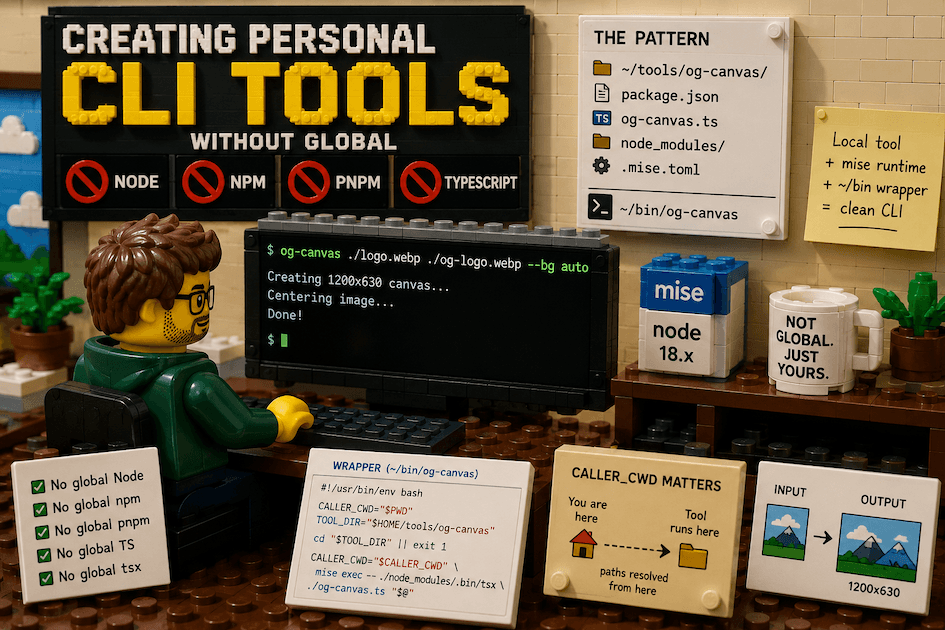
The clean pattern is:
~/tools/og-canvas/
├─ package.json
├─ og-canvas.ts
├─ node_modules/
└─ .mise.toml

~/bin/og-canvas
~/tools/og-canvas contains the real tool.
~/bin/og-canvas is just a small wrapper script exposed through PATH.
The wrapper
#!/usr/bin/env bash

CALLER_CWD="$PWD"
TOOL_DIR="$HOME/tools/og-canvas"

cd "$TOOL_DIR" || exit 1

CALLER_CWD="$CALLER_CWD" mise exec -- ./node_modules/.bin/tsx ./og-canvas.ts "$@"
This does three important things:
- Saves the original directory where the command was called.
- Moves into the tool folder so local dependencies resolve correctly.
- Uses
mise execto provide Node without needing global Node.
Why CALLER_CWD matters
At first, the tool tried to find the input image inside ~/tools/og-canvas, because the wrapper had changed directory.
So this:
og-canvas ./logo.webp ./og-logo.webp
was interpreted as:
~/tools/og-canvas/logo.webp
Instead of:
current-folder/logo.webp
The fix was to preserve the caller directory and resolve user paths from there.
Inside the TypeScript script:
const callerCwd = process.env.CALLER_CWD ?? process.cwd();

const resolveFromCaller = (value: string) =>
  path.isAbsolute(value) ? value : path.resolve(callerCwd, value);

const inputPath = resolveFromCaller(inputArg);
Same for the output path.
The actual example tool
The tool itself is simple:
og-canvas ./logo.webp ./og-logo.webp
It creates a 1200x630 image by increasing the canvas around the original image.
Later, it can support background color options:
og-canvas ./logo.webp ./og-logo.webp --bg "#f7f3ea"
og-canvas ./logo.webp ./og-logo.webp --bg auto
The image stays centered. The canvas grows.
Where PATH belongs
On macOS with zsh:
export PATH="$HOME/bin:$PATH"
belongs in:
~/.zprofile
Not necessarily ~/.zshrc.
Rule of thumb:
~/.zprofile  -> login shell setup: PATH, mise, Homebrew
~/.zshrc     -> interactive shell setup: aliases, prompt, completions
The final mental model
Global:
- mise
- ~/bin/og-canvas wrapper

Managed by mise:
- node

Local to the tool:
- sharp
- tsx
- typescript
No global Node. No global npm. No global pnpm. No global TypeScript. No global tsx.
Just one executable wrapper in ~/bin.
The takeaway
For personal CLI tools, you do not need to publish a package or install language tooling globally.
A better pattern is:
local tool project + local dependencies + mise runtime + ~/bin wrapper
It gives you a real command available everywhere, while keeping the runtime and dependencies isolated.
This scales nicely for small personal tools: image utilities, text transformers, markdown helpers, metadata scripts, project generators, and anything else that should feel global without polluting your global environment.
References
- mise documentation — the runtime manager that provides Node per-tool
- Node.js documentation — official API reference
Related: Running Claude CLI Without Global Node on macOS — the same mise-based pattern applied to a real CLI.