
There are more kinds of software test than anyone can keep straight — unit, integration, contract, snapshot, mutation, smoke, load, chaos. This post walks through each one, what it actually buys you, and whether it earns its place in a real codebase.
The question is almost never "should we test this?" It's "is this kind of test worth what it costs, here?" Testing isn't a virtue you accumulate — it's a set of investment decisions, each with a return and a price, and the skill is telling the good trades from the bad ones. A team with great cost-benefit instincts and a small suite ships faster and breaks less than a team that reflexively tests everything the most expensive way it can.
So this post walks through the full landscape of software tests, and for each one it weighs both sides of the trade: the benefit it delivers, the costs it imposes, and — the part that actually matters — when the trade is worth taking. The same test type can be an obvious yes in one situation and a clear waste in another. The goal here isn't to catalogue tests; it's to help you make that call.
The two sides you're weighing
Cost-benefit reasoning only works if you can see both sides clearly, so here's the texture of each.
Benefit is mostly one thing — confidence, i.e. information about whether your software works — but it comes in different flavors that are worth naming, because different tests deliver different ones: bug-catching power (will it find real defects?), refactor safety (can I change code without fear?), documentation (does it explain intent?), design pressure (does writing it improve the code?), and feedback speed (how fast does it tell me?). A test can score high on one and zero on another.
Cost is genuinely multi-dimensional, and the mistake is collapsing it to "it's slow." The dimensions that actually move the decision:
- Authoring cost — time and skill to write it, including setup, fixtures, and mocks.
- Maintenance cost — how often it breaks on unrelated changes, and what each break costs to fix. Usually the largest lifetime cost and the one most often ignored at write-time.
- Execution cost — time per run × how often it runs.
- Infrastructure cost — machines, browsers, devices, environments, service accounts, CI minutes, money.
- Feedback latency — delay between writing a bug and being told. A slow signal changes your behavior for the worse.
- Flakiness cost — intermittent failures without real bugs erode trust in the whole suite; this cost compounds.
- Cognitive cost — how hard it is to read and reason about.
- False-confidence cost — the chance it passes while the thing it "protects" is broken. The most dangerous cost, because it stops you looking.
Tests by scope: the pyramid
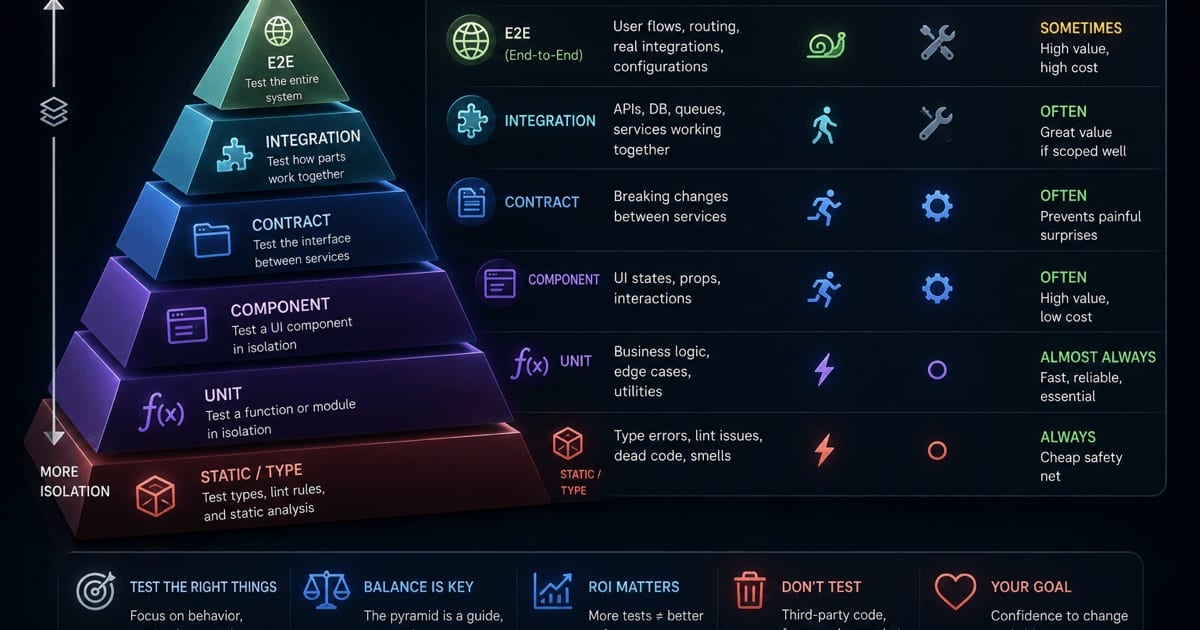
The classic slice is by how much of the system a test exercises at once — few big tests, many small ones. Still the most useful model there is.
The test pyramid — slice by scope: many cheap unit tests at the base, a thin cap of slow end-to-end tests on top.
Unit tests
One small piece of code — a function, hook, reducer — in isolation, with collaborators mocked.
Benefit. Pinpoint feedback (a failure tells you exactly where), near-instant execution so you can have thousands, executable documentation of a unit's contract, and design pressure — code that's hard to unit-test is usually badly coupled. Strong on refactor safety only if they test behavior, not internals.
Cost. Cheap per test, but the mocks are where it bites: every mock is an assumption that silently rots when the real collaborator changes, producing false confidence and over-mocked tests that break on harmless refactors — pure maintenance tax.
Worth it when the logic has real branching, edge cases, or algorithmic substance. A waste when you're testing trivial glue or asserting on implementation details; there, they cost maintenance and buy nothing.
Integration tests
Several units together, or your code against a real dependency (real database, real ORM).
Benefit. Catches the bugs units structurally can't — wrong queries, serialization mismatches, bad wiring, wrong assumptions about a library. Hits the seams where a large share of real bugs live, so confidence-per-test is high.
Cost. Slower (real I/O), higher feedback latency, more infrastructure (a database in CI, fixtures, teardown), and more flakiness surface from state and timing.
Worth it when you want the best confidence-to-cost ratio in the suite — which is most of the time. The "testing trophy" argues these, not units, should be your center of gravity, and for most apps that's right.
Component tests (frontend)
A UI component rendered with its real logic and children, network stubbed — React + Testing Library, asserting on what a user sees and does.
Benefit. Tests behavior, not internals, so it survives refactors; catches integration bugs between a component and its hooks/context/children; fast enough for a watch loop.
Cost. The render environment (jsdom/happy-dom) approximates a browser, so real layout/CSS/event bugs slip through; async UI is a flakiness magnet if you wait wrong.
Worth it when you're building anything nontrivial in React — this is the sweet spot for frontend confidence and should be the bulk of a UI suite. It's also why the frontend fattens the pyramid's thin middle: a component test drives its real hooks and children in jsdom at near-unit speed, so the classic assumption that integration is slow-and-therefore-rare doesn't hold — you can afford lots of them. Don't reach past it to end-to-end (E2E) tests for logic a component test can cover.
Contract tests
Verify two services agree on their interface — consumer defines expectations, provider verifies it meets them — without running both together (e.g. Pact).
Benefit. Lets independently deployed services or a frontend/API pair evolve safely; catches breaking interface changes at provider build time; far cheaper and more stable than E2E for that one job.
Cost. Conceptual overhead and a broker/contract-store to run; only pays off with real cross-team or cross-service coordination.
Worth it when multiple teams or services share an interface. Overkill for a solo app or a single team owning both sides — there, a plain integration test is enough.
End-to-end (E2E) tests
The whole system driven as a user — real browser, frontend, backend, database — through a full flow like checkout (Playwright, Cypress).
Benefit. Highest-fidelity automated confidence: it proves the assembled system actually works across every seam. A few over your critical revenue paths buy a lot of real peace of mind.
Cost. Expensive on nearly every axis — slowest execution, worst feedback latency, heaviest infrastructure, and the worst flakiness of any category, which is where team trust in CI goes to die. When one fails, the cause could be anywhere in the stack.
Worth it when — and only when — the flow is critical and genuinely needs full-stack verification (login, checkout, signup). A small handful is invaluable; a large E2E suite testing edge cases is one of the worst trades in testing. Push everything you can down to cheaper tiers.
System tests
E2E's broader sibling: the whole integrated system validated against requirements, often in dedicated staging, including config and non-functional aspects.
Benefit. Closest automated proxy for "does this work in production," verifying the system as a whole before release.
Cost. Production-like environment (big infrastructure/money), slow, broad diagnostic difficulty; overlaps heavily with E2E for web apps.
Worth it when the system is large, high-stakes, or regulated. For a typical web app, E2E over critical paths usually covers this more cheaply.
Cost vs. confidence by tier — the dashed ring marks the sweet spot: integration/component tests buy the most confidence per unit of cost.
Tests by intent
The pyramid slices by scope; these slice by why you're running — and most can live at any pyramid level.
Smoke tests
A tiny fast suite: is the build alive or completely dead? Does it boot, load, log in?
Benefit vs cost. Near-zero cost, high early-warning value — run first in CI to fail fast before wasting the full suite on a dead build.
Worth it essentially always; the only risk is letting it grow until it's no longer tiny.
Sanity tests
A narrow check after a specific change: does this one thing now work, without running everything?
Benefit vs cost. Fast targeted confidence during development, but usually informal and not a durable asset.
Worth it as a workflow convenience mid-development, not as something you invest in maintaining.
Regression tests
Not a technique but a purpose: any test kept to ensure past behavior doesn't break again. Most of your suite is this. Classic habit: fix a bug, write a test that reproduces it so it can't silently return.
Benefit. The compounding payoff of automated testing — turns "we fixed this" into "this stays fixed," and enables fearless refactors and dependency upgrades. Arguably the whole reason automated suites exist.
Cost. The maintenance tax accrues precisely because you keep these forever; suites bloat with tests for behavior nobody cares about anymore.
Worth it as your default posture — but pair it with the discipline to delete obsolete regression tests, which is as important as writing them and the thing teams most neglect.
Acceptance tests (user acceptance testing, UAT)
Verify the software meets business requirements — "does it do what we agreed?" — often in Given/When/Then (behavior-driven development, BDD) style.
Benefit. Aligns output with intent, gives stakeholders a shared language, and doubles as living executable specification.
Cost. Maintaining the Given/When/Then glue is real work, and BDD tooling only pays off if non-technical people actually read the specs; as full E2E flows they inherit E2E's costs.
Worth it when non-technical stakeholders genuinely engage with the specs. Otherwise BDD is just a verbose, slow way to write tests — skip the ceremony.
Exploratory testing
A skilled human probing without a script, using intuition to find what automation never imagined.
Benefit. Finds the bugs your suite has no imagination for — weird sequences, confusing UX, "why does it do that?" Scripted tests only check what you already thought of; this doesn't have that blind spot.
Cost. Human time — doesn't scale, isn't repeatable, can't gate CI, quality depends on the tester.
Worth it for genuinely new features and before big releases. Complement, never substitute — turn what it finds into automated regression tests.
Correctness techniques
Specific, mostly automatable techniques that go beyond hand-written assertions.
Snapshot tests
Render output, save it, fail on any diff.
Benefit. Near-zero authoring cost; good at catching unintended changes in large output you'd never assert by hand.
Cost. High false-positive and false-confidence rates — the path of least resistance is to blind-update snapshots without reading the diff, at which point they verify nothing, and big snapshots make review a rubber stamp.
Worth it for small, stable, meaningful outputs. A liability when snapshots are large or churn often — one of the easiest test types to misuse.
Visual regression tests
Screenshot the rendered pixels, diff against a baseline.
Benefit. Catches the whole class of visual/styling breakage that DOM tests miss — shifted layouts, wrong colors — invisible to getByText but obvious to a user. High value for design systems.
Cost. Infrastructure-heavy; needs consistent rendering or you get pixel-diff flakiness from environment noise, plus baseline management, usually via a paid service.
Worth it when visual fidelity is a real product concern (design systems, pixel-sensitive UI) — but use a hosted tool rather than rolling your own, or the flakiness will eat you.
Property-based tests
Assert a property that holds for all inputs; the framework generates hundreds of randomized cases and shrinks any failure to a minimal one (fast-check).
Benefit. Explores input space you'd never enumerate, routinely finding edge cases example tests miss; free minimal repro via shrinking. Very high value for pure logic, parsers, algorithms.
Cost. Higher cognitive cost — thinking in invariants is a harder, different skill, and not every function has an obvious property; slower and occasionally flaky if a property is only almost true.
Worth it for pure, logic-dense functions with clear invariants. Poor fit for glue and UI — a sharp tool with a narrow blade.
Mutation testing
Injects small bugs into your code and checks whether your tests catch them — it tests your tests (Stryker).
Benefit. The most honest answer to "is my suite any good?" Coverage says which lines ran; mutation says whether a bug in them would be noticed. Ruthlessly exposes tests that execute code without asserting anything.
Cost. Very expensive — re-runs the suite per mutant, so minutes to hours; can't live in the normal loop.
Worth it as an occasional audit of suites that matter, not a continuous gate. Run it periodically to find your hollow tests, then go back to normal.
Fuzz testing
Bombard the system with malformed/random input to find crashes, hangs, and security holes.
Benefit. Excellent at crash and security bugs — the inputs no sane user sends but an attacker will; has found enormous numbers of real vulnerabilities.
Cost. Needs infrastructure and long run times; turning crashes into fixes takes expertise.
Worth it for code that parses untrusted input (parsers, format handlers, network-facing code). Low relevance for ordinary CRUD logic.
Characterization / golden master / approval tests
Capture current behavior as the "golden master"; any change to output fails.
Benefit. Indispensable for wrapping a safety net around legacy code before refactoring — locks in "whatever it does now" without needing to understand or specify it first.
Cost. Encodes current behavior including current bugs and can't tell you whether that behavior is correct, only unchanged; approving new output can go mindless.
Worth it as a transitional tool for taming scary legacy code you're about to change — explicitly not a long-term correctness strategy.
Non-functional tests: not "does it work" but "how well"
Everything above mostly checks correctness. These check qualities — and they're where teams under-invest most, usually until an incident rebalances the budget for them.
Performance testing (a family)
Speed, responsiveness, and stability under conditions. Load (expected traffic — will you survive a busy day?), stress (past the limit — where and how do you break?), spike (sudden surges — flash sales, virality), soak/endurance (sustained hours/days — surfaces slow leaks nothing else catches), scalability (performance vs added load/resources — capacity planning).
Benefit vs cost. Enormous value for anything with real traffic, since performance bugs found in production cost far more than any test. But the whole family is infrastructure- and expertise-heavy, high-latency, and only as trustworthy as the environment's resemblance to production.
Worth it when you have real traffic and real performance requirements. Premature for a low-traffic app — you'd be paying to answer a question you don't have yet.
Security testing (a family)
SAST (static application security testing — scans source for vulnerability patterns; early, cheap, but noisy with false positives), DAST (dynamic application security testing — probes the running app, finding runtime/config issues SAST can't, but needs a deployment), dependency/SCA scanning (software composition analysis — checks packages for known CVEs, i.e. publicly catalogued vulnerabilities; huge value for near-zero effort, given how much of an app is dependencies), penetration testing (skilled humans actively attacking — deepest and most realistic, but expensive specialist time, point-in-time).
Benefit vs cost. Asymmetric payoff — one prevented breach outweighs years of tooling — against a dominant cost of expertise and ongoing triage of findings.
Worth it: SCA and SAST in CI are close to free wins for almost everyone; pen testing is worth it as stakes and attack surface rise. Match depth to what you'd lose in a breach.
Accessibility testing (a11y)
Usable by people with disabilities — screen readers, keyboard nav, contrast, ARIA (accessible rich internet applications markup). Partly automatable (axe-core, jest-axe), partly manual.
Benefit. Widens your audience, is legally required in many places, and improves UX and robustness for everyone. The automated slice drops cheaply into an existing component-test setup.
Cost. Tools catch only a third to half of real issues, so meaningful coverage needs manual testing with actual assistive tech; fixes can mean nontrivial markup changes.
Worth it: the automated checks belong in every frontend suite (high value, low cost); manual a11y is worth it in proportion to your audience and legal exposure — and for public-facing products, that's most of them.
Usability testing
Watch real users attempt real tasks to find what's confusing or frustrating.
Benefit. The only reliable way to learn whether people can actually use what you built — catches problems no correctness test can express.
Cost. Human-intensive (recruiting, sessions, synthesis), not automatable, qualitative.
Worth it for new products and major flows — expensive per insight, but often the highest-leverage testing a product can do.
Compatibility testing
Works across the matrix it must support — browsers, versions, OSes, devices, screen sizes.
Benefit. Essential for the web, where you don't control the runtime; catches the "broken on Safari / that one Android" bugs that hit a real slice of users.
Cost. The combinatorial matrix is the cost, and real devices mean a lab or paid cloud grid.
Worth it whenever you ship to the open web — but the smart move is to deliberately narrow the supported matrix and use a hosted grid, rather than test everything.
Internationalization / localization (i18n / l10n)
Handles multiple languages, locales, currencies, date formats, and text direction (including right-to-left, RTL).
Benefit. Prevents the classic globalization bugs — overflowing layouts from longer strings, broken RTL, mangled formats, hardcoded English.
Cost. Locale data, sometimes native-speaker review, and a flexible-enough UI to test against.
Worth it if and only if you're actually going multi-locale — but if you are, it's badly under-tested and worth real attention.
Static analysis: testing without running the code
Nothing executes, but it catches bugs, so it counts — type checking (TypeScript), linting (ESLint).
Benefit. The cheapest, fastest feedback loop that exists — errors surface in your editor as you type, before any test runs. TypeScript eliminates whole bug classes (nulls, wrong shapes, typos) at zero runtime cost; linting catches known footguns. Feedback latency near zero.
Cost. Upfront setup, a learning curve at the type system's edges, occasional friction when the checker is stricter than reality needs.
Worth it: close to unconditionally. This is the highest-ROI "testing" most codebases can adopt and belongs as the foundation under everything else — for a TypeScript project you already have it; lean on it harder before reaching for runtime tests.
Progressive delivery: testing in and with production
Modern deployment blurs "test" and "release." These test with real traffic.
Canary releases
Roll a change to a small fraction of real users, watch metrics, proceed only if healthy.
Benefit vs cost. Ultimate fidelity (real traffic, real data) with limited blast radius — catches what no pre-prod environment could reproduce. But needs feature flags, traffic splitting, solid observability, and automated rollback first.
Worth it once you have the infrastructure maturity and enough traffic for signal — a complement at the far end, never a replacement for pre-release testing.
A/B testing
Serve two variants to segments and compare outcomes — hypothesis testing against real behavior.
Benefit vs cost. Measures actual behavior and business impact rather than opinion, but needs experimentation infrastructure, enough traffic for significance, and statistical literacy to avoid false conclusions.
Worth it for product decisions where the impact justifies the setup — and note it answers "which is better," not "is it correct."
Chaos engineering
Deliberately inject failures (kill servers, add latency) to verify graceful degradation and recovery.
Benefit vs cost. Proves resilience works before a real outage tests it, and uncovers false redundancy assumptions — but needs organizational maturity, strong observability, and careful blast-radius control, or you cause the outage you feared.
Worth it for large distributed systems where partial failure is a constant. Overkill for a small monolith.
Cross-cutting ways to classify any test
- Manual vs automated. Manual costs almost nothing to author and brings human judgment, but doesn't scale or gate CI; automated costs more upfront and in maintenance but runs forever. Rule of thumb: automate what you'll repeat, keep humans for exploration, usability, and judgment.
- White vs black vs gray box. White-box uses internal structure (most units) — precise but brittle to refactors; black-box knows only inputs/outputs (E2E, acceptance) — refactor-robust but vague about where it broke; gray-box (much integration/component work) sits between and is often the sweet spot.
- Functional vs non-functional. "Does it do the right thing?" vs "how well — fast, secure, accessible, resilient?" Most teams over-buy the first and under-buy the second, right up until an incident corrects them.
How to actually spend
No test type is "best" — that's the whole point of the cost-benefit lens. You're assembling a portfolio, and the same test can be an obvious yes or a clear waste depending on what you're protecting and what it costs you here.
The classic test pyramid says many cheap unit tests at the base, fewer integration, very few slow E2E at the top — still sound, especially "very few E2E." The newer testing trophy — Kent C. Dodds's reframing, built around React Testing Library and its "test the way your software is used" philosophy — reweights it for modern apps: static analysis as the foundation, then units, then a fat middle of integration/component tests, then a thin E2E cap. The argument is that integration-level tests give the best confidence-to-cost ratio without E2E's fragility — and in the frontend those tests are cheap (a component with its real collaborators in jsdom), so the pyramid's reason for keeping the middle thin no longer applies. For a React/TypeScript codebase, that shape tends to fit better.
The testing trophy — the modern reweighting for React/TypeScript apps: static analysis as the foundation, a fat middle of integration/component tests, a thin E2E cap.
Either way the decision procedure is identical, and it's the one this whole post is built around: for each thing you want to protect, ask what's the cheapest test that gives me real confidence here — and take that trade, not the most thorough one available.
Push testing down the pyramid whenever you can; never write an E2E test for a bug a unit or integration test could catch. Reserve each expensive tier for what only that tier can verify. And treat the suite as a living asset with running costs — delete tests that have stopped earning their maintenance, because a smaller suite you trust beats a huge one you've learned to ignore.
The green checkmark was never the goal, and neither was maximum coverage. The goal is the most confidence you can buy for what you can afford to keep.
Related: Beyond Bug Catching — the benefits of testing that have nothing to do with finding bugs.