
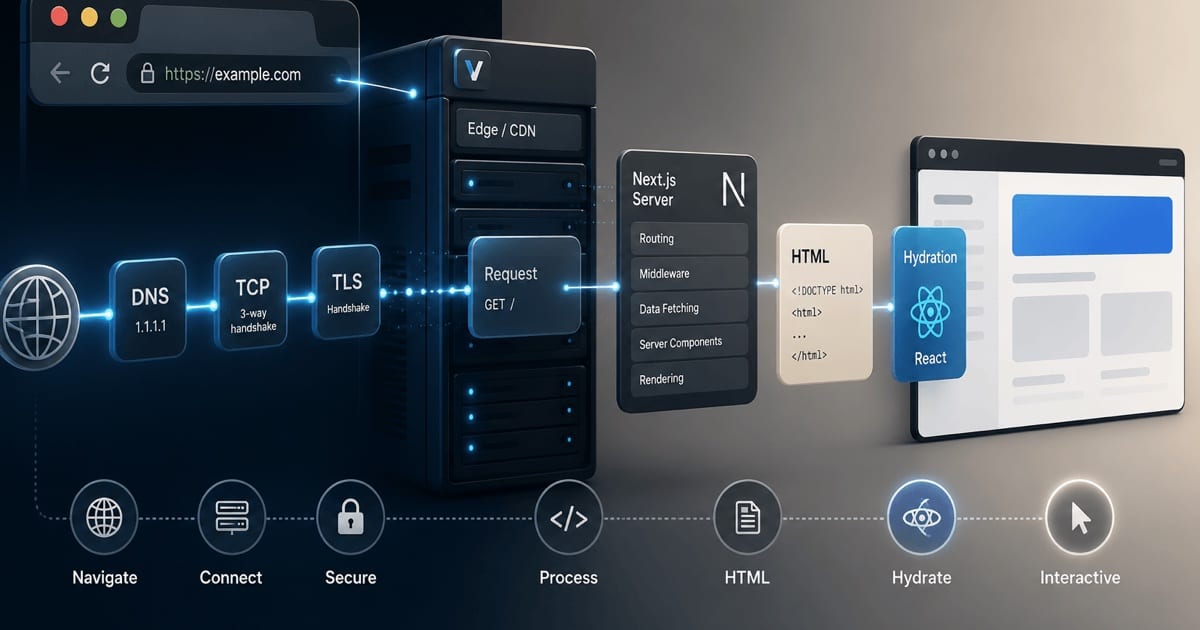
You type a domain, hit Enter, and a second later you're clicking around a working app. That second is deceptively busy. Between the keystroke and the first working button there's a DNS lookup, a couple of cryptographic handshakes, a streamed HTML document, a fan of parallel downloads, a serialized React tree, and a reconciliation pass that stitches JavaScript onto server-rendered markup without throwing any of it away.
This post walks the whole thing, end to end, with a bias toward the parts that are usually hand-waved: the connection, how the browser discovers the files buried in the HTML, how many of them load at once, and what "hydration" is actually doing at the DOM level. I'll use the App Router — React Server Components (RSC), streaming, the RSC payload — as the reference model, because that's what a modern Next.js app ships. (For where this single strategy sits among all the others, see Every Way to Render a React Component.)
Part 1 — Establishing the connection
Nothing about Next.js has happened yet. Before a single byte of your app arrives, the browser has to build a pipe to the server.
DNS resolution: a stack of caches
The domain is a name; the network needs an IP. Resolution walks a chain of caches, stopping at the first hit:
- Browser DNS cache — Chrome keeps its own short-lived cache (you can inspect it at
chrome://net-internals/#dns). - OS cache — the operating system's resolver cache.
hostsfile — a static override, if present.- Recursive resolver — your configured DNS server (ISP, or something like
1.1.1.1/8.8.8.8, increasingly over DNS-over-HTTPS so the lookup itself is encrypted). If it doesn't know the answer, it walks the authoritative hierarchy: root → TLD (.com) → the domain's authoritative nameserver. The answer comes back asA(IPv4) and/orAAAA(IPv6) records, cached according to their time-to-live (TTL). In practice, for a warm domain this is often sub-millisecond; a cold lookup can cost 20–120ms. This is exactly what<link rel="dns-prefetch">and<link rel="preconnect">are for — warming this step (and the next two) before the browser strictly needs them.
TCP: the three-way handshake
With an IP in hand, the browser opens a TCP connection: SYN → SYN-ACK → ACK. That's one full round trip (RTT) before any application data can flow. Over a 40ms link, that's 40ms spent just agreeing to talk.
(If the origin speaks HTTP/3, this step and the next collapse into QUIC over UDP — more on that below.)
TLS: the handshake that makes it HTTPS
Almost every real deployment is HTTPS, so a TLS handshake follows:
| TLS version | Fresh handshake | Resumed session |
|---|---|---|
| TLS 1.3 (common case today) | ||
| TLS 1.2 | 1 RTT |
TLS 1.3's fewer round trips are a meaningful reason its adoption matters for cold-load latency.
During the handshake the client sends a ClientHello (supported ciphers, extensions), the server responds with its certificate and key material, and both derive session keys. Two things worth knowing happen here:
- SNI (Server Name Indication) tells the server which certificate to present when many hostnames share one IP — the norm behind content delivery networks (CDNs).
- ALPN (Application-Layer Protocol Negotiation) is where the client and server agree on HTTP/2 vs HTTP/1.1. This single field decides how parallel your resource loading gets, so hold that thought.
Who you're actually connecting to
For most Next.js deployments (Vercel, Netlify, a CDN in front of a container) you are not connecting to the origin that runs your React code. You connect to an edge node geographically close to you. That edge either serves a cached/static response directly or opens its own (already-warm, pooled) connection back to the origin function. The handshakes above are between you and the edge — which is why the edge being nearby matters so much.
The protocol decides your parallelism
This is the fork in the road that everything downstream depends on:
| Protocol | Connections per origin | Concurrency model | Head-of-line blocking |
|---|---|---|---|
| HTTP/1.1 | ~6 parallel TCP connections | One request at a time per connection | |
| HTTP/2 | 1 | Many multiplexed streams (HPACK, per-stream priority) | |
| HTTP/3 | 1 (QUIC / UDP) | Many multiplexed streams |
HTTP/1.1's six-connection cap is the old concurrency ceiling, and each of those connections paid its own TCP+TLS tax (pipelining exists in the spec but is effectively unused). HTTP/2 removes the workaround with one multiplexed pipe; HTTP/3 additionally folds the transport and crypto handshakes together (1-RTT, or 0-RTT on resumption).
For a modern CDN-fronted deployment the real rivalry is HTTP/2 vs HTTP/3. They share the multiplexed-streams model, so the difference is entirely in the transport underneath — and that transport decides how the connection behaves under real network conditions:
| Dimension | HTTP/2 | HTTP/3 |
|---|---|---|
| Transport | TCP | QUIC, over UDP |
| Multiplexing | Streams over one TCP connection | Streams over QUIC |
| Head-of-line blocking | one lost packet stalls every stream | a loss stalls only its own stream |
| Handshake to first byte | separate TCP + TLS | transport + crypto folded (0-RTT on resume) |
| Connection migration | a network/IP change breaks the connection | survives IP changes via connection IDs (Wi-Fi ↔ cellular) |
| Header compression | HPACK | QPACK (tolerates out-of-order delivery) |
| Encryption | TLS (universal in practice) | Mandatory — built into QUIC |
| If UDP is blocked | — | reverts to HTTP/2, advertised via Alt-Svc |
The short version: HTTP/3 wins wherever the network is lossy or changes underfoot (mobile, congested Wi-Fi); on a clean wired connection the two are close, and HTTP/2 is still the pragmatic floor because it's universally supported.
Keep this in mind for Part 4: whether your fifteen JS chunks download as fifteen genuinely-parallel streams or get queued six-at-a-time is decided right here, during ALPN.
The whole connection dance, end to end:
Part 2 — The server's turn (why it changes what the browser receives)
The browser sends GET / and the App Router goes to work. I'll keep this short because the focus is the browser, but two server behaviors directly shape what lands in the browser:
- Server Components render on the server. They're
asyncby default, so your data fetching and database queries run here, next to the data, and never ship to the client. React renders them into HTML and into a serialized description called the RSC payload (more in Part 5). - The response streams. Next.js doesn't buffer the whole page. Using
Transfer-Encoding: chunked, it flushes the shell immediately and sends<Suspense>boundaries later, as their data resolves. Each late chunk arrives as a hidden<template>plus a tiny inline script that swaps it into place. The consequence for the browser: it starts receiving — and parsing — usable HTML before the server has finished generating the page. That's the whole reason server-side rendering (SSR) feels fast.
Part 3 — Receiving and parsing the HTML
Parsing is incremental
The browser doesn't wait for the full document. As bytes stream in, the HTML parser tokenizes them and builds the DOM node by node. Because Next.js sent real, content-filled HTML (not an empty <div id="__next">), meaningful pixels can paint while the rest is still on the wire — this is your First Contentful Paint, and crucially it happens before any of your JavaScript has run.
The blocking rules that govern the main parser
As the parser walks the document, certain tags change its behavior:
| Tag | Blocks the parser? | Blocks first paint? | Executes |
|---|---|---|---|
<script> (plain, no async/defer) | Immediately, in source order | ||
<link rel="stylesheet"> | — | ||
<script defer> / <script type="module"> | After parsing, in order | ||
<script async> | On arrival, order not guaranteed |
Two footguns hide in that table: a blocking <script> in <head> serializes everything after it (the classic performance footgun), and a stylesheet also blocks any subsequent script — because that script might query computed styles.
Next.js leans on defer/module semantics for its bundles specifically so the parser never stalls on framework code.
The preload scanner: the browser's second parser
Here's the piece that's almost always skipped, and it's the answer to "how does the browser detect the files in the HTML."
The main parser can be blocked — for example, sitting on a synchronous script. If discovery of other resources waited on the main parser, a single blocking script early in the document would serialize everything after it. So browsers run a second, speculative parser called the preload scanner (also "lookahead pre-parser").
While the main parser is busy or blocked, the preload scanner races ahead through the raw byte stream, looking only for things worth fetching early: <script src>, <link href>, <img src>/srcset, <video poster>, and preload hints. Anything it finds, it starts downloading immediately, in parallel, before the main parser has even reached that node.
This has two practical consequences you can feel:
- Resource order in the HTML matters. The scanner discovers things top-to-bottom in source order; that ordering feeds directly into fetch prioritization.
- Resources the scanner can't see are late. Anything injected by JavaScript (an image
srcset at runtime, a dynamically-added stylesheet) is invisible to the scanner and only discovered once that JS runs — which is why<link rel="preload">exists: it puts an otherwise-hidden resource somewhere the scanner will see it.
Part 4 — Discovering and loading the sub-resources
Now the concrete question: for a Next.js page, what gets loaded, how many at once, and how the browser decides the order.
What a Next.js page actually references
Open the network tab on a cold App Router load and you'll see a fairly predictable set of assets, roughly in these buckets:
- The document itself — the streamed HTML, which already contains the inline RSC payload as a series of
self.__next_f.push([...])script blocks. - CSS — one or more stylesheets. With CSS Modules (which you use), Next.js extracts the styles for the route into hashed
.cssfiles and links them in the<head>, render-blocking, so there's no flash of unstyled content. - The JavaScript runtime + framework chunks — a small
webpackruntime chunk, aframeworkchunk (React and the reconciler), amain-appchunk (the App Router client runtime), and shared chunks. - Route + component chunks — code-split per route, plus a separate chunk for each
'use client'component tree the page needs. A Server-Component-only page pulls no component JS for those parts, because they shipped as HTML. - Fonts — if you use
next/font, the font files are self-hosted, preloaded, and referenced with<link rel="preload" as="font">so they don't cause layout shift. A representative streamed<head>looks something like this:
<head>
  <link rel="preload" href="/_next/static/media/inter.woff2" as="font" type="font/woff2" crossorigin>
  <link rel="stylesheet" href="/_next/static/css/route-abc123.css" data-precedence="next">
  <link rel="preload" href="/_next/static/chunks/webpack-9f2a.js" as="script">
  <script src="/_next/static/chunks/webpack-9f2a.js" defer></script>
  <script src="/_next/static/chunks/framework-4b1c.js" defer></script>
  <script src="/_next/static/chunks/main-app-77de.js" defer></script>
  <link rel="modulepreload" href="/_next/static/chunks/app/page-e5f0.js">
</head>
Note the deliberate use of preload/modulepreload so the scanner and the network layer start these before the parser reaches the executing <script> tags.
How many load in parallel
This is where Part 1's protocol negotiation pays off:
- Over HTTP/2 or HTTP/3 (what a CDN-fronted Next.js app uses), essentially all discovered resources download concurrently over the single connection. There's no fixed "N at a time" limit; instead the server and browser use stream priorities to decide who gets bandwidth first. Fifteen chunks genuinely stream in parallel.
- Over HTTP/1.1, you're capped at ~6 concurrent connections per origin, so those fifteen chunks queue in waves of six. This is the old world, and it's why bundlers historically obsessed over reducing request counts.
The "HTTP/2 or HTTP/3" lumping above hides one difference that matters exactly here — during a burst of parallel chunk downloads, what happens when a single packet drops:
| When a packet drops mid-download | HTTP/2 | HTTP/3 |
|---|---|---|
| Immediate effect | every stream on the connection blocks (TCP head-of-line blocking) | only the stream carrying that packet stalls |
| Your 15 parallel chunks | all 15 wait for the one retransmit | the other 14 keep flowing |
| Where it bites | mobile, congested Wi-Fi | stays fast on those same networks |
So both load "all in parallel," but only HTTP/3 keeps that parallelism honest when the network misbehaves.
The _next/static assets are all same-origin, so they share whichever regime applies. If you pull anything cross-origin (analytics, a font CDN you didn't self-host), that's a separate origin with its own connection and its own handshakes — hence preconnect.
How the browser orders them
Even with everything "parallel," bandwidth is finite, so the browser assigns a fetch priority to each resource and the HTTP/2 layer schedules accordingly:
| Resource | Fetch priority |
|---|---|
| Render-blocking CSS, parser-blocking scripts | |
defer/module scripts, preloaded fonts | |
| In-viewport images | |
| Below-the-fold images | |
| Prefetches for future navigation | |
You can nudge this with the fetchpriority attribute, but Next.js's defaults are already tuned so that the critical path (CSS + framework + route chunk) wins the race for bandwidth. |
The waterfall, conceptually
Read it top-to-bottom. The connection steps form a strict staircase — TCP waits for DNS, TLS waits for TCP, the HTML request waits for TLS. But watch the sub-resources: they deliberately break that staircase, starting while the HTML is still streaming (the preload scanner at work) and downloading in parallel, not one after another.
The gap between FCP and TTI is the "uncanny valley" of SSR: the page looks done but isn't clickable yet. Everything in Part 5 is about closing that gap.
Part 5 — Reconciliation and hydration
The DOM exists. It's styled. It is completely inert — no event listeners, no state, no reactivity. Turning that corpse into a live React app is hydration, and to understand it you first need the artifact it's built from.
The RSC payload
Alongside the HTML, the server embedded the RSC payload (React's "Flight" serialization format) as those inline self.__next_f.push([...]) scripts. It's not HTML and it's not your component source — it's a compact, streamable description of the rendered Server Component tree: a sequence of numbered rows describing elements, their props, and — critically — references to Client Components by module ID rather than inlined code.
Conceptually a row looks like:
1:["$","div",null,{"className":"card","children":["$","$L2",null,{"count":3}]}]
2:I["/_next/static/chunks/counter-a1b2.js",["Counter"]]
Row 1 is a plain server-rendered div. The $L2 inside it is a lazy module reference — a placeholder saying "here sits a Client Component, and its code lives in the chunk named in row 2." This is the mechanism that lets Server Components (pure HTML, zero client JS) and Client Components (interactive, needs JS) interleave in one tree.
Reconciliation vs. creating the DOM
Normally, when React mounts, it builds its internal fiber tree and then creates DOM nodes to match. During hydration it does something different and more delicate: it builds the fiber tree from the RSC payload + your Client Component code, then walks the existing server-rendered DOM and adopts it — matching each fiber to the DOM node the server already produced, rather than creating a new one.
That "match against what's already there" step is reconciliation in hydration mode. React expects the tree it computes on the client to line up, node for node, with the DOM the server sent. When it matches, React simply attaches event listeners and internal references to the existing nodes — cheap, no re-creation, no layout thrash.
Only Client Components hydrate
This is the App Router's defining efficiency. Walk the fiber tree and there are two kinds of nodes:
| Component type | Ships as | Client-side JS | Hydrates? |
|---|---|---|---|
| Server Component | HTML | None | No — it's just DOM |
Client Component ('use client') | HTML + referenced chunk | Downloaded & executed | Yes — the interactive islands |
| So your JavaScript bundle contains code only for the interactive parts of the page, not the whole page. A mostly-static page with two interactive widgets hydrates two small subtrees and leaves the rest as inert HTML forever. |
Selective and progressive hydration
React 18+ made hydration concurrent and interruptible, and Next.js leans on it:
- Content inside a
<Suspense>boundary hydrates independently. The page doesn't block on one giant synchronous hydration pass; boundaries come alive as their code and data are ready. - Hydration is prioritized by interaction. If you click a widget that hasn't hydrated yet, React notices the pending event, hydrates that subtree first, then replays your click. You rarely perceive the wait.
- Because it's interruptible, hydrating a heavy page doesn't lock the main thread the way React 17's all-at-once hydration could.
Once a subtree finishes hydrating, that region hits Time to Interactive — state works,
useEffectfires, handlers respond.
Hydration mismatches (the failure mode to respect)
Hydration's whole premise is that server HTML equals what the client would render. When they disagree — a timestamp computed with Date.now(), a window-dependent branch, a random value, locale-sensitive formatting — React detects the mismatch, warns in the console, and (depending on version and where it occurs) may discard the server HTML for that subtree and re-render it on the client. That throws away the SSR benefit exactly where it happened and can cause a visible flash. The practical rule: render deterministically on the server, and defer anything genuinely client-only to an effect or a 'use client' boundary guarded for the browser.
Part 6 — Interactive, and everything after
Once hydration completes, Next.js takes over navigation and the network model flips entirely.
Clicking a <Link> no longer requests a full document. The client router fetches only the RSC payload for the destination route, reconciles it against the current tree, and swaps in what changed — the surrounding layout stays mounted, no re-hydration, no full reload. Links that scroll into view get their payloads prefetched at low priority, so the transition feels instant when you finally click.
That's the arc: a heavyweight first load optimized for fast paint (streamed SSR) and fast interactivity (islands + selective hydration), followed by lightweight client navigations that never pay the DNS/TLS/document cost again. (The appendix traces exactly when one of those navigations still has to touch the server.)
The whole thing in one breath
- Resolve the domain through layered DNS caches.
- Connect: TCP handshake, then TLS 1.3 (1-RTT), negotiating HTTP/2 or HTTP/3 via ALPN — which sets your parallelism ceiling.
- Request
GET /; the edge serves or invokes the origin. - Server render: Server Components run (your data/DB access), producing streamed HTML + an inline RSC payload.
- Receive & parse the HTML incrementally; paint styled content at FCP before any JS runs.
- Discover sub-resources via the main parser and the preload scanner; download them — all-parallel over HTTP/2, six-at-a-time over HTTP/1.1 — ordered by fetch priority.
- Reconcile & hydrate: React builds a fiber tree from the RSC payload, adopts the existing DOM, and wires up only the Client Component islands, selectively and by interaction priority.
- Interactive (TTI), after which navigation is client-side RSC fetches with prefetching. The mental model that makes all of it click: the server ships something that already looks right, and the browser's job is to make it behave right without rebuilding what's already on screen. Every optimization along the way — streaming, the preload scanner, HTTP/2 multiplexing, islands, selective hydration — is in service of shrinking the gap between "looks right" and "behaves right."
Appendix: what happens when you navigate to another page?
So far this has all been about the first load. Once the app is interactive, navigating to another route inside it is a completely different animal — and the honest answer to "does it ask the server, or is it already client-side?" is both, conditionally. Every in-app navigation is a soft transition handled by the client router (the document is never reloaded and shared layouts stay mounted), but whether it actually touches the server depends on what's already sitting in the client-side Router Cache. When the server is asked, it doesn't send a new HTML page — it sends a partial RSC payload for only the segments that changed.
Here's the whole decision, start to finish:
The key branch is the middle one: a fresh cache hit renders with zero network, while a miss falls through to the server — but even then it's a lightweight payload, never a full page.
Does the navigation hit the server?
| Scenario | Server request? | What comes back |
|---|---|---|
| Prefetched route, still fresh in the Router Cache | Nothing over the wire — rendered from the client cache | |
| Stale entry, dynamic route, or a click before prefetch finished | The RSC payload for the changed segments | |
Hard navigation (full reload, window.location, external link) | A fresh HTML document — the entire boot sequence |
The moving parts
- Soft vs hard navigation. A
<Link>orrouter.push()is a soft navigation — the client router handles it in place, so the document never reloads and shared layouts stay mounted. A full reload or an external URL is a hard navigation that restarts the whole Part 1–5 sequence. - Prefetching. As a
<Link>scrolls into view, Next prefetches the destination's RSC payload at low priority — static routes prefetch fully, dynamic routes up to the nearestloadingboundary. This is why most navigations feel instant: the payload is already cached before you click. - The Router Cache. Prefetched and previously-visited payloads live in an in-memory, client-side cache keyed by route segment. A hit means no network request at all; a miss (or a stale/dynamic entry) falls through to the server. Exactly how long entries stay "fresh" has shifted across Next.js versions, so treat it as the rule fresh cache → no request, otherwise ask rather than a fixed number.
- Partial rendering. When the server is asked, it returns the RSC payload for only the segments that changed — an unchanged layout is neither re-fetched nor re-rendered.
- Chunk reuse. Client Component JavaScript downloaded on the first load is reused; only genuinely new
'use client'chunks are fetched, and nothing that didn't change re-hydrates. - Reconciliation. The incoming payload is reconciled against the current React tree — the same diffing machinery from Part 5 — and only the changed subtrees are swapped in the DOM.
So the honest answer is both, conditionally: a client-side navigation always stays in the browser, reaches the server only when the destination isn't already cached, and even then fetches a partial payload for the changed segments — never a whole page.
That's the read side of a running app. The other half — the streamed POSTs you'll see when a form submits or a mutation runs — are Server Actions, a separate wire shape entirely. How a running Next.js app talks to the server picks up exactly here and maps both.
References
- Next.js Documentation — the App Router, streaming, and the RSC rendering model.
- React —
hydrateRoot— hydration and server/client markup matching. - React — Server Components — what renders on the server and ships zero JavaScript.