
Online payments sound scary until you look at them from the top down: how the money actually moves, how you're allowed to touch card data, and what the customer is really paying with. This guide builds that mental model one layer at a time.
This is an educational overview of how payments work, not PCI-DSS, legal, or compliance advice. In production, use a PCI-compliant payment provider and never store or handle raw card numbers yourself.
Payments answer one deceptively simple question:
Did the money move — and can you prove it?
That sounds simple, but a card payment is actually a stack of different ideas: authorizing and capturing, holds and reservations, iframes and redirects, PCI compliance, tokenization, 3D Secure, settlement, payouts, reconciliation, and chargebacks.
Payment vs payout. A payment is the customer authorizing money to leave their account. A payout (or settlement) is the net money actually landing in your bank account, days later, minus fees. They're constantly confused. Most of the surprises in payments come from forgetting that these are two different events separated by time.
The confusing part is that people mix up three different layers:
| Layer | Question | Examples |
|---|---|---|
| Money movement | How does the money actually move? | Authorization, capture, settlement, refund |
| Data & compliance | How are you allowed to touch card data? | PCI DSS, redirect, iframe / hosted fields, tokenization |
| Methods & rails | What is the customer paying with? | Cards, wallets, bank transfers, BNPL (buy now, pay later) |
Underneath all three: the wire and the rules. Every layer here assumes a secure channel — HTTPS/TLS — and a contract with someone who can reach the card networks. Without TLS, card details can be read in transit; without an acquirer/processor relationship, you can't touch the rails at all. Card data in motion must always ride encrypted, and most of the Data & compliance layer exists to keep raw card numbers from ever touching your servers in the first place.
These three layers are the backbone of this guide. But before any of them makes sense, you need to know who the players are — because a card payment is never just "you and the customer."
The cast: who's actually involved
Before we can follow the money, we have to know who's touching it — because a card payment is never just you and the customer. It's famously a four-party model: the merchant never talks to the customer's bank directly, a chain of intermediaries does that on your behalf. Here's the full cast and the job each one does.
| Party | Who it is | Role |
|---|---|---|
| Cardholder | Your customer | Owns the card, authorizes the payment |
| Issuer | The cardholder's bank | Issued the card; approves or declines; holds the money |
| Merchant | You | Sells something, requests the payment |
| Acquirer | The merchant's bank | Holds your merchant account, receives funds |
| Card network | Visa, Mastercard, Amex… | The rails connecting issuer and acquirer |
| Gateway / PSP | Stripe, Adyen, Braintree… | The tech layer you actually integrate with |
Gateway vs processor vs acquirer. In the classic model these are distinct: the gateway transmits the request, the processor does the technical processing, the acquirer is the bank that holds your funds. Modern PSPs (payment service providers) like Stripe or Adyen bundle all three behind one API, so you rarely meet them separately — but they're still there, and they each take a fee.
In plain terms
You don't move the money. You ask the customer's bank — through a chain of middlemen — to move it, and then you wait for it to actually arrive.
Layer 1 — Money movement: how the money actually moves
This is the first of our three layers — and the heart of the whole system: the actual movement of money, from the moment a customer approves a charge to the moment cash lands in your account. It's also the part most people get wrong, and it all comes down to one idea:
Approving a payment is not the same as receiving the money. They are two separate steps, often separated by days.
Authorization: reserving the money
Everything begins by asking, not taking. An authorization asks the issuer: "Does this card have the funds, and may I take this amount?" If yes, the issuer places a hold on the funds — it reduces the cardholder's available balance — but no money moves yet.
Authorize €80.00 → issuer reserves €80.00 → available balance drops €80.00
                   (the money has NOT left the account yet)
You've seen this hold in the wild:
- A hotel holds an estimated amount at check-in.
- A gas station holds a flat amount before you pump.
- A car rental holds a deposit you never actually pay.
The hold has an expiry (typically 5–7 days for cards, shorter for some types). If you never capture, the hold silently falls off and the money is released.
Incremental authorization. Some flows let you grow an existing hold — a hotel extending the reservation as your bar tab climbs. Not all card types support it; the alternative is to void and re-authorize.
Capture: actually taking it
Reserving funds is only half the job — at some point you have to actually take them. That's capture: it tells the network to move the reserved funds for real, and it's the step that finally charges the customer.
You can capture less than you authorized (partial capture — you authorized €80 but the final basket is €72), and some processors allow multiple captures against one auth (shipping an order in parts).
Auth-and-capture vs sale
There are two shapes:
| Pattern | What happens | When to use |
|---|---|---|
| Sale (auth + capture) | One step: authorize and capture together | Digital goods, anything delivered instantly |
| Auth then capture | Two steps, separated in time | Physical goods — capture when you ship |
Why separate them? In many places you shouldn't take the money until you fulfil the order. Two-step lets you reserve the funds at checkout (so you know they're good) and only capture when you actually ship — and void cleanly if you can't.
Void and refund: the two ways to give money back
These are not the same, and confusing them causes real pain:
| Action | When | What it does | Customer sees |
|---|---|---|---|
| Void | Before capture/settlement | Cancels the authorization; releases the hold | Hold disappears; often no statement line at all |
| Refund | After capture/settlement | A new, separate transaction sending money back over the rails | A charge and a later credit |
A refund is not an undo. Once money has settled, you can't "cancel" it — you send a fresh transaction in the opposite direction. It costs fees, takes days to land, and the original charge still happened. Prefer a void when you still can.
Clearing, settlement, and payout
You've captured the money — but you still can't spend it. Authorization is real-time; everything after it is batched and slow.
- Clearing — the captured transactions are submitted in a batch; the network works out the amounts.
- Settlement — the actual funds move between issuer and acquirer.
- Payout — the PSP deposits the net amount (your sales minus refunds, chargebacks, and fees) into your bank account, usually on a rolling delay (T+1, T+2…) or schedule.
This delay is why reconciliation exists. What you captured and what lands in your bank are never the same number on the same day — fees are deducted, refunds netted out, and payouts are grouped. We come back to this in the Operational layer.
In plain terms
Authorize = "put a hold on it." Capture = "ring it up." Settle = "the banks move the cash." Payout = "it shows up in my account, minus everyone's cut."
Layer 2 — Data & compliance: how you're allowed to touch card data
Layer 1 was about moving money. Layer 2 is about the data that moves with it — the card number itself — and the rules for who's allowed to touch it. The moment your systems see a raw card number, you inherit a mountain of security obligations, so this layer is almost entirely about a single strategy: never let the raw card number touch your servers.
PCI DSS: the rulebook
Every obligation in this layer traces back to one rulebook. PCI DSS (Payment Card Industry Data Security Standard) is the security standard set by the card networks (via the PCI Security Standards Council) for anyone who stores, processes, or transmits cardholder data — primarily the PAN (the long card number).
It's not optional and it's not a law — it's a contractual requirement of being allowed to accept cards. Non-compliance means fines and, ultimately, losing the ability to take payments.
The golden rule: reduce your scope. Every system that touches card data falls "in scope" for PCI. The whole game is to make that set of systems as small as possible — ideally empty — by letting a PSP handle the raw card number for you.
How scope is measured: SAQ levels
Most merchants prove compliance with a Self-Assessment Questionnaire (SAQ). Which SAQ you fill in depends entirely on how card data reaches the processor — and they differ enormously in size:
| SAQ type | How card data is handled | Roughly how many controls | Scope |
|---|---|---|---|
| SAQ A | Fully outsourced — card entry lives entirely on the PSP | ~22 | |
| SAQ A-EP | You build the form, but a third party processes the data | ~190 | |
| SAQ D | Card data hits your servers; you process and/or store PAN | ~300+ |
The jump from SAQ A to SAQ D is the difference between answering a couple of dozen questions and running a full enterprise security program with audits, network segmentation, and penetration testing. This is why the integration model you choose is a security and cost decision, not just a UX one.
Which SAQ you land in is decided on the frontend. The single biggest factor is where the card number is actually typed — on the PSP's domain or yours. That's exactly what the next section, Frontend integration, is about.
Tokenization: storing cards without storing cards
If you're not allowed to store the card number, how do you ever charge the same customer twice? You store a stand-in instead. When a PSP takes a card, it gives you back a token — an opaque reference like tok_1a2b3c — that represents the card without being the card.
| You store | You don't store |
|---|---|
| A token | The card number (PAN), expiry, CVC (the security code) |
You use the token for future charges: card-on-file, subscriptions, one-click checkout. A leaked token database is far less catastrophic than a leaked card database — a token is only usable by your account at that PSP.
Network tokens. Beyond PSP tokens, the card networks themselves issue network tokens that can auto-update when a customer's card is reissued, reducing failed recurring payments. Same idea, deeper in the stack.
What you actually store
So if the raw card never lands in your database, what does? In practice you keep a small, boring record — safe to leak, and just enough to charge again, display, and reconcile — while the PSP holds everything sensitive on your behalf.
| Safe to keep | Why you need it |
|---|---|
Payment token (tok_… / payment-method id) | Charge again later — card-on-file, subscriptions, one-click |
| Card brand + last 4 digits | Show "Visa ending 4242" in the UI; harmless on their own |
| Expiry month / year | Display, and to drive retry and network-token logic |
| Auth / payment-intent / charge id | The handle you capture, refund, and reconcile against |
| Idempotency keys | Recognise a retried request and avoid double-charging |
| Your own order & ledger rows | Amount, currency, status — your source of truth for the sale |
And the things that must never sit in your systems:
| Never store | Even encrypted? |
|---|---|
| Full card number (PAN) | Storing it is exactly what drags you into SAQ D — don't |
| CVC / CVV / security code | Never — prohibited once the payment is authorized, encrypted or not |
| Full magnetic-stripe / chip track data, PIN | Sensitive authentication data — must never be retained |
The CVC rule trips everyone up. You may keep a token and a card's last four indefinitely, but you may never store the CVC after authorization — encrypted or not. That's why card-on-file charges and subscriptions never re-ask for the security code: the PSP was never allowed to hand it to you in the first place.
3D Secure and SCA: proving the cardholder is present
3D Secure (3DS — branded as Visa Secure, Mastercard Identity Check) adds an authentication step where the issuer verifies the cardholder, often via a banking-app approval or a one-time code.
Two things make it matter:
- Liability shift. When a payment is authenticated with 3DS and later turns out fraudulent, liability for the chargeback typically moves from you to the issuer.
- Regulation. In the EU/UK, PSD2 (the EU's second Payment Services Directive) mandates Strong Customer Authentication (SCA) — most online card payments must be authenticated with two of three factors (knowledge / possession / inherence). 3DS2 is the technical means to satisfy it.
Frictionless vs challenge. 3DS2 sends the issuer rich context (device, history) so most payments pass frictionlessly with no customer interaction. Only riskier ones get the visible challenge. Good integrations lean on frictionless flow to avoid hurting conversion.
In plain terms
Don't touch the card number. Let the PSP's redirect or iframe catch it, hand you a token, and use 3D Secure to make the bank vouch for the customer.
Frontend integration: how the card form reaches the page
This is the practical face of Layer 2. The PCI rules above raise one concrete frontend question: where is the card number actually typed? Every integration pattern below is an answer to that question — and the answer decides both your PCI scope (which SAQ from the previous section) and how much control you have over the checkout.
Why all these patterns exist
They exist for one reason: to move the moment of card entry off your page and onto the PSP's domain, so the raw card number never enters your systems and your PCI scope collapses toward SAQ A. Everything is the same trade-off, expressed as a single dial:
The dial: the further you push card entry toward the PSP's domain, the smaller your PCI scope and the less UX control you have. The further you pull it toward your own code, the more control — and the bigger and costlier your compliance burden. Redirects and iframes are simply the tools that let you sit anywhere on that dial.
All the kinds at a glance
| Kind | How the card is captured | Where the PAN goes | PCI scope | UX control | Stays on your URL? | Multi-method? |
|---|---|---|---|---|---|---|
| Payment link / no-code | PSP-hosted checkout URL you just send | PSP only | No | Yes | ||
| Redirect | Browser navigates to the PSP's page | PSP only | No | Yes | ||
| Full-page iframe | Whole PSP page embedded in one <iframe> | PSP only | Yes | Yes | ||
| Drop-in widget | PSP-rendered widget (bundle of iframes) you mount | PSP only | Yes | Yes | ||
| Hosted fields | Each input is its own cross-origin iframe | PSP only | Yes | Cards-ish | ||
| Express / wallet button | Apple Pay / Google Pay sheet via the browser | Wallet → PSP | Yes | Wallets | ||
| Direct API / raw fields | Your own <input>s post to your server | Your server → PSP | Yes | Yes |
The rest of this section walks them from most outsourced to most control.
Payment links / no-code
The minimum possible integration: the PSP generates a checkout URL (or a QR code / email button) and you simply send the customer to it. There is no payment UI in your app at all — no SDK, no form, often no code.
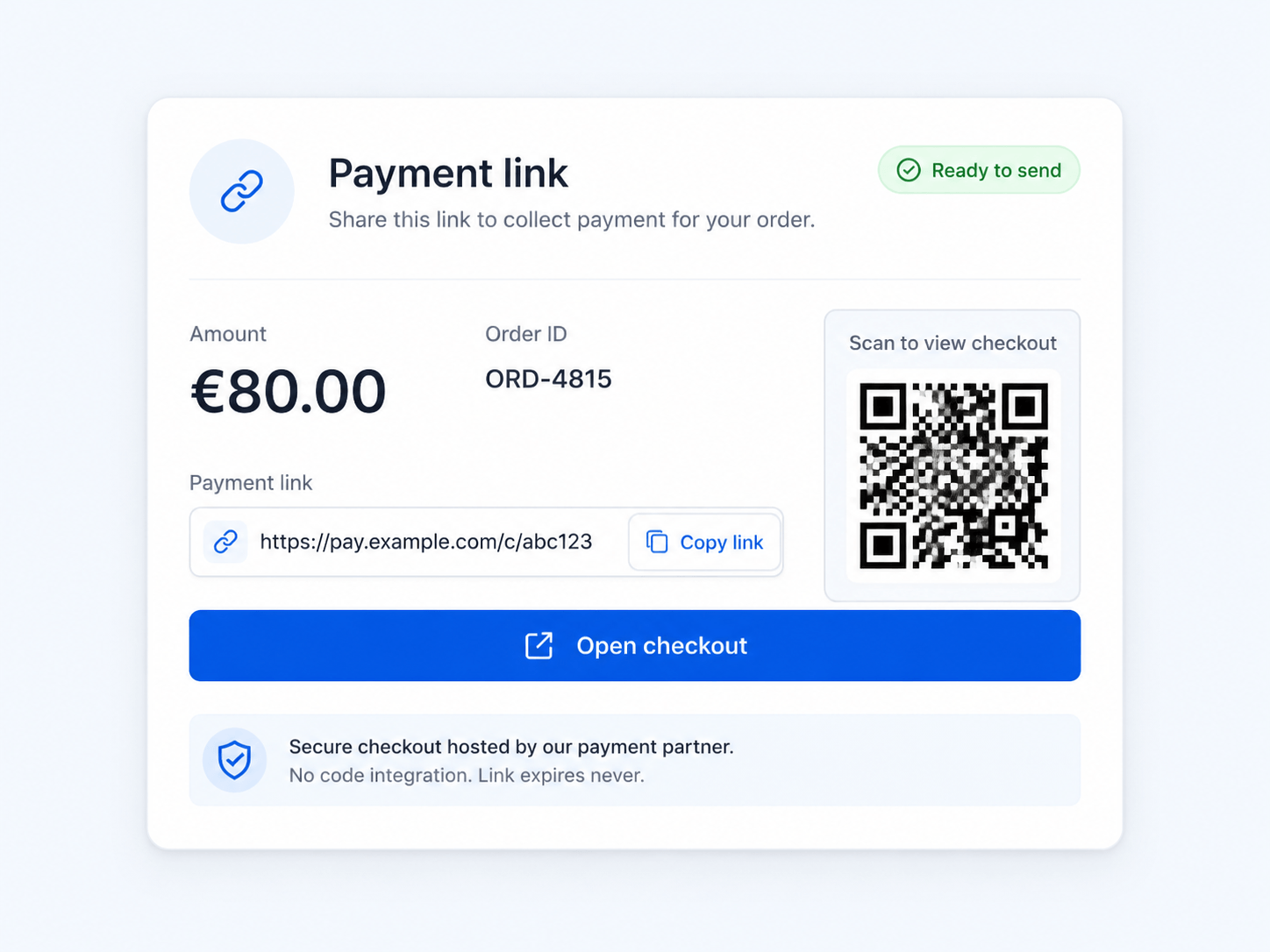
You: create a link for €80  →  https://pay.psp.com/c/abc123
Customer: opens it → pays on the PSP → gets a receipt
You: learn the result via a webhook
Why it exists: for invoices, social-media selling, or getting paid before you've built a checkout. Zero engineering, SAQ A — at the cost of zero control and no in-app flow.
Redirect / hosted payment page
You keep your own cart and checkout, then bounce the customer to a page hosted by the PSP to enter the card. The number is typed on the PSP's domain — never yours — and the customer is redirected back with a result.
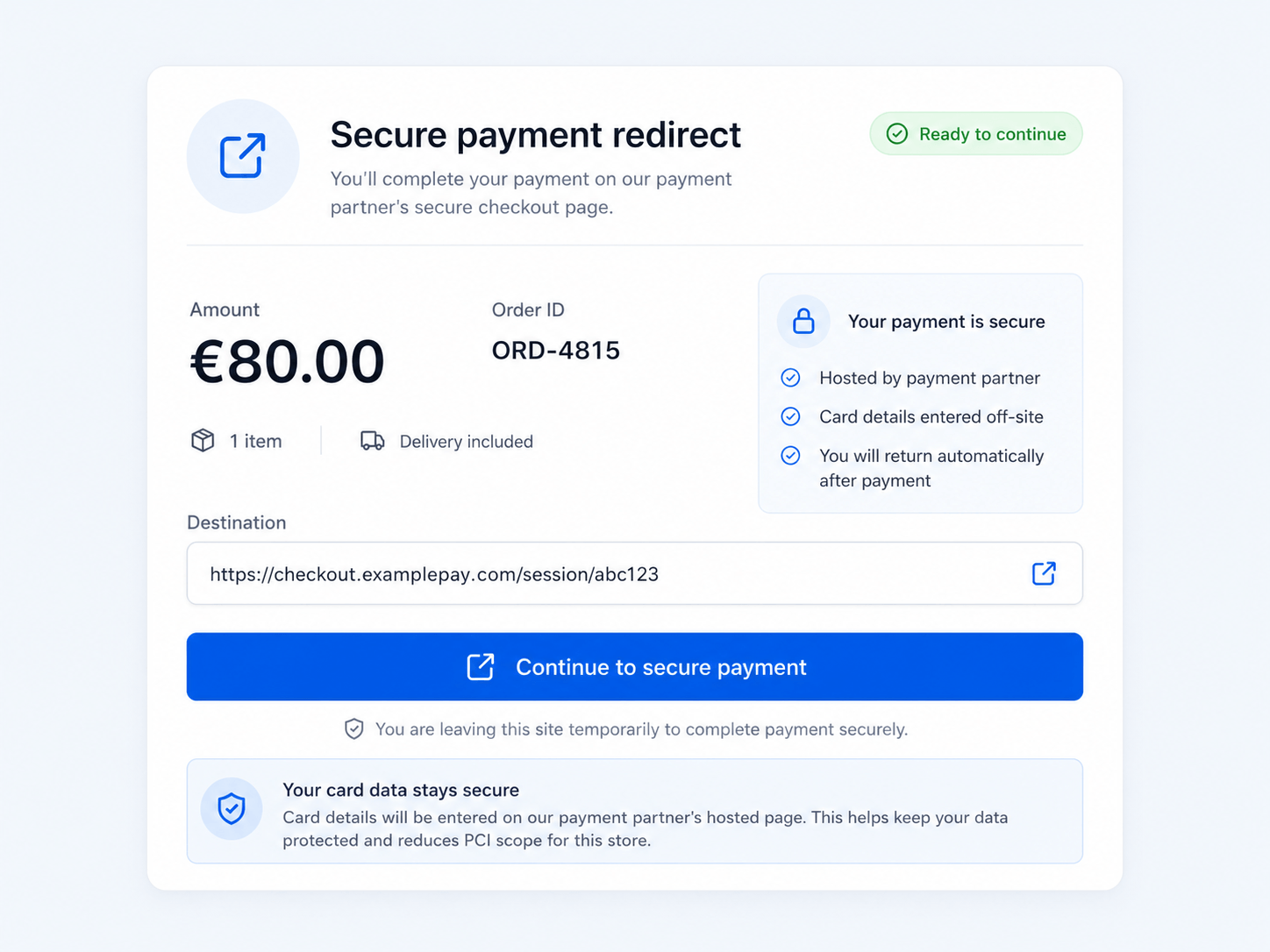
Never trust the redirect back alone. The browser can be manipulated, and the user can close the tab mid-flow. Always confirm the final status server-side (via the PSP API or a webhook) before you treat an order as paid. We'll come back to webhooks in the operational layer.
Why it exists: the simplest path to SAQ A while keeping your own cart — at the cost of the look-and-feel and a brief trip off your site.
Full-page iframe (embedded hosted page)
This is the "just an iframe" case. Instead of navigating away, you embed the entire PSP payment page inside a single <iframe> on your own page. The customer never leaves your URL; visually, the PSP's page sits in a box on yours.
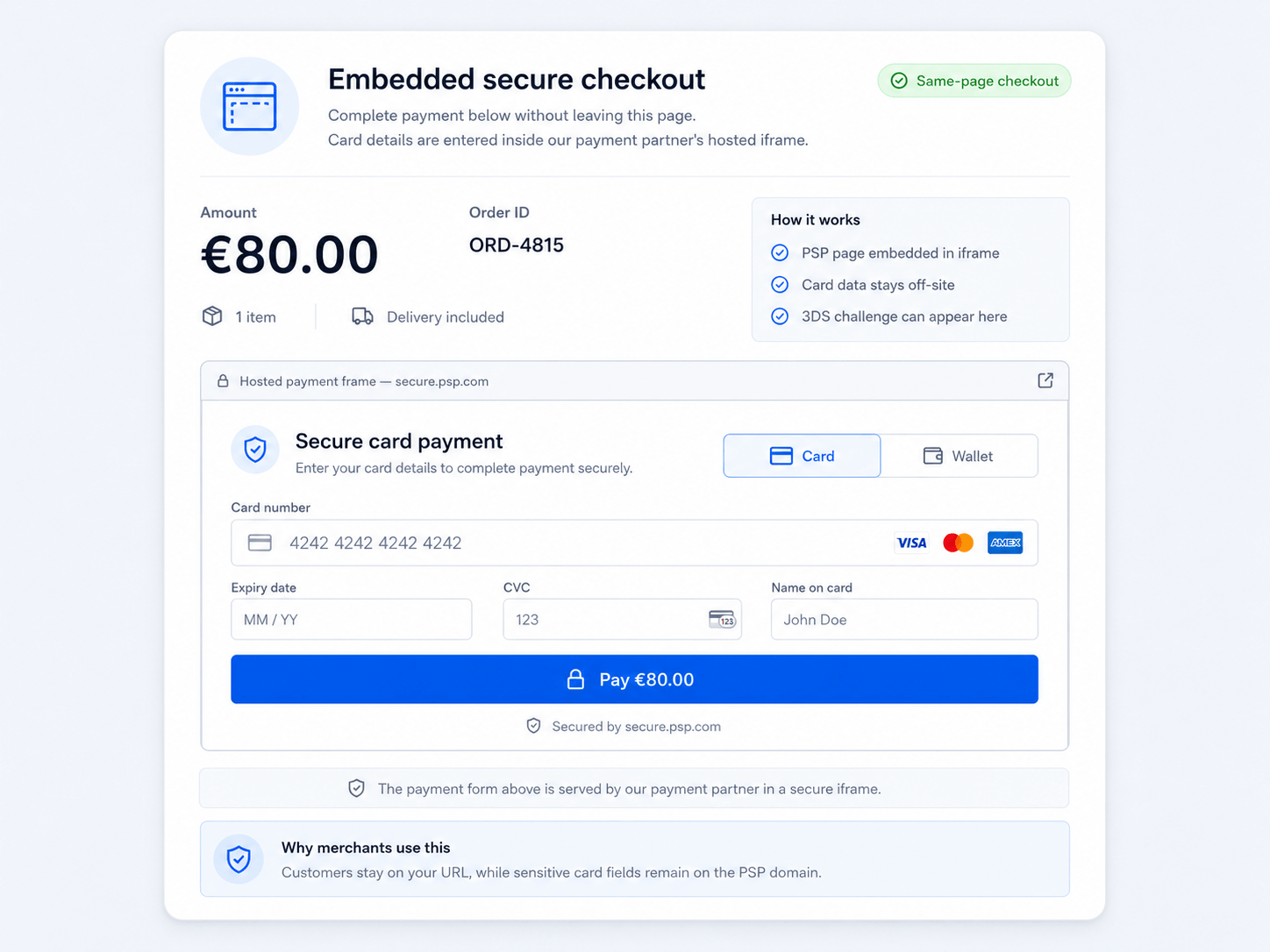
┌─ your checkout page (your domain) ───────────────┐
│  Order summary…                                  │
│  ┌─ <iframe src="psp.com/pay/abc"> ───────────┐  │
│  │  Card  [ __________________ ]               │  │  ← the whole PSP page,
│  │  Exp [ ____ ]   CVC [ ___ ]                 │  │     rendered by the PSP,
│  │  [ Pay €80 ]                                │  │     inside one iframe
│  └─────────────────────────────────────────────┘  │
└────────────────────────────────────────────────────┘
Because the iframe's content is served from the PSP's origin, the card data lives entirely inside it — your page can't read it (still SAQ A). When the payment finishes, the iframe tells your page it's done by sending a postMessage to the parent window (see the deep-dive below), and any 3D Secure challenge is shown right inside that same iframe.
Why it exists: you want the customer to stay on your URL and you're happy to let the PSP own the whole form's layout. Less native than hosted fields, simpler than wiring up individual fields.
Drop-in / prebuilt component
A middle ground that most PSPs now push as the default: you mount a PSP-rendered widget — Stripe's Payment Element, Braintree's / Adyen's Drop-in — with a few lines of JS. Under the hood it's a bundle of iframes plus logic, but you treat it as one component.
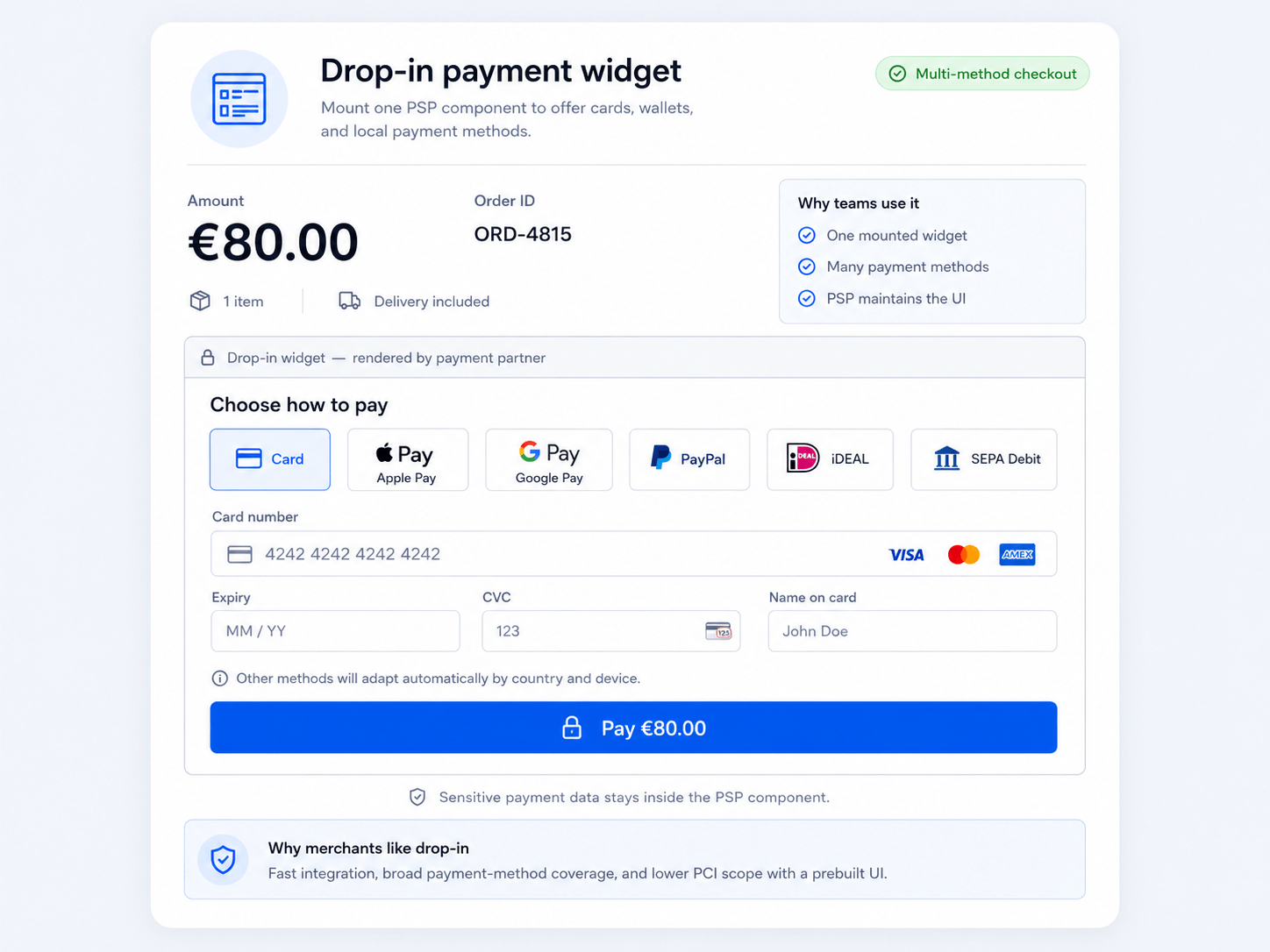
// conceptually: a few lines, the PSP renders the rest
const dropin = psp.create("payment", { ...options });
dropin.mount("#payment-slot");
Crucially, the widget renders many payment methods at once — cards, wallets, local methods like iDEAL or SEPA — and adapts to the customer's country and device automatically. You style it through an options/theme API, not by reaching into its DOM.
Why it exists: the best scope-to-effort ratio. SAQ A, near-native UX, multiple payment methods, and the PSP keeps the widget up to date — all without you building field-by-field.
Hosted fields (iframed inputs)
The most native-looking SAQ A option, and the technique most people don't realise they're using. Tools like Stripe Elements, Braintree Hosted Fields, and Adyen Components render each card input as its own tiny cross-origin <iframe> served from the PSP's domain, dropped into your form layout.
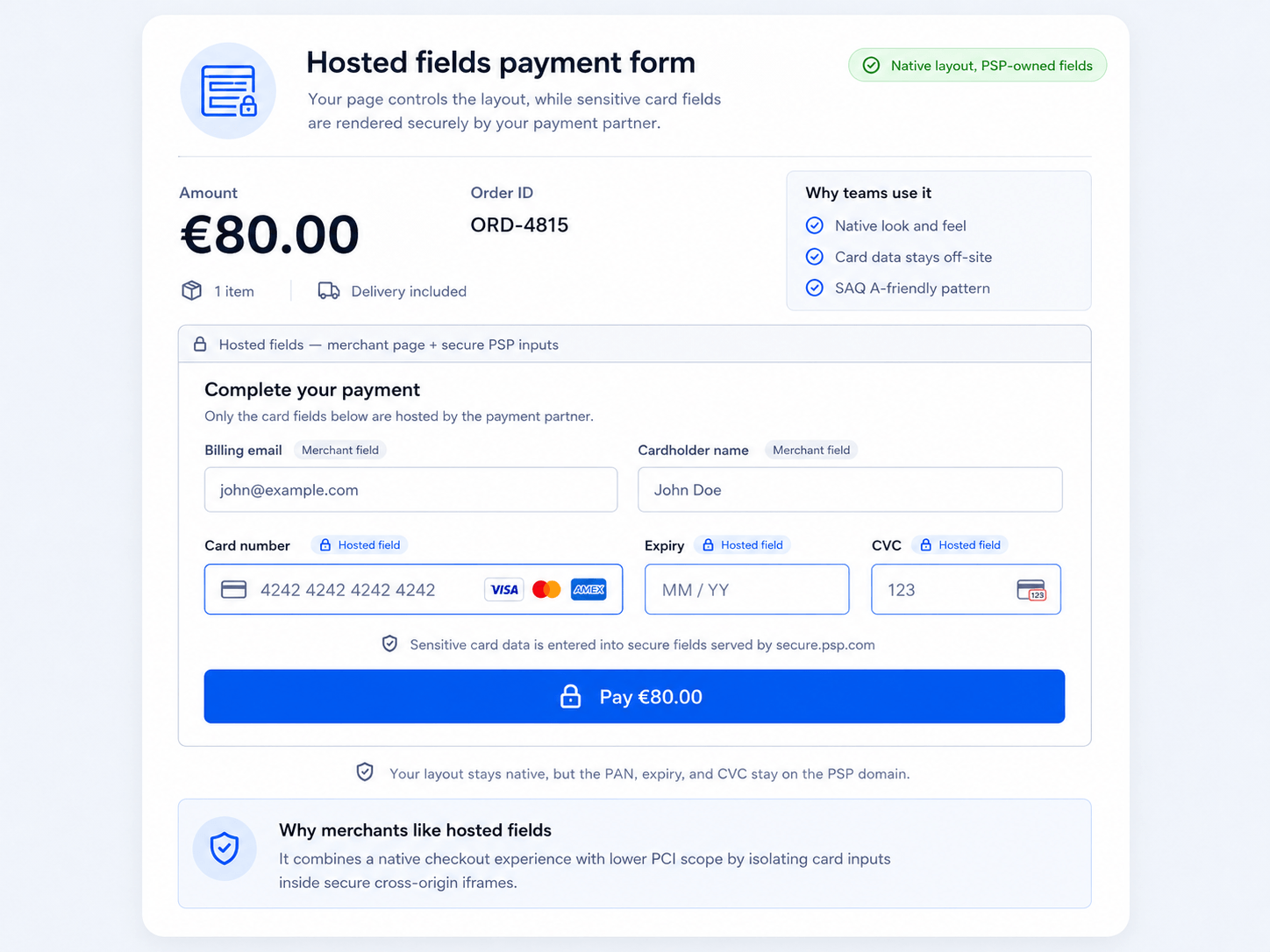
┌─ your checkout form (your domain) ───────────────────────────┐
│  Name  [ ____________________ ]  ← your input                 │
│                                                               │
│  Card  [ iframe: PSP domain ]    ← PSP owns this              │
│  Exp   [ iframe: PSP domain ]    ← PSP owns this              │
│  CVC   [ iframe: PSP domain ]    ← PSP owns this              │
│                                                               │
│  [ Pay ]  ← your button, calls PSP JS, never sees the PAN     │
└───────────────────────────────────────────────────────────────┘
Because each input is a cross-origin iframe, the same-origin policy physically prevents your JavaScript from reading what the customer types. The raw PAN goes straight from the iframe to the PSP, which hands your code back a token (Tokenization above). Your page never sees the card number — SAQ A — yet the fields sit inside your own form and look completely native.
Why it exists: when you want pixel-level control of the checkout layout but still refuse to touch the PAN. Maximum UX control at SAQ A.
Express / wallet buttons
Apple Pay and Google Pay surface as a single express button. Tapping it opens a browser/OS-mediated payment sheet — the customer confirms with biometrics, and the wallet returns a tokenized card to the PSP. You render a button and handle the result; you never see card details.
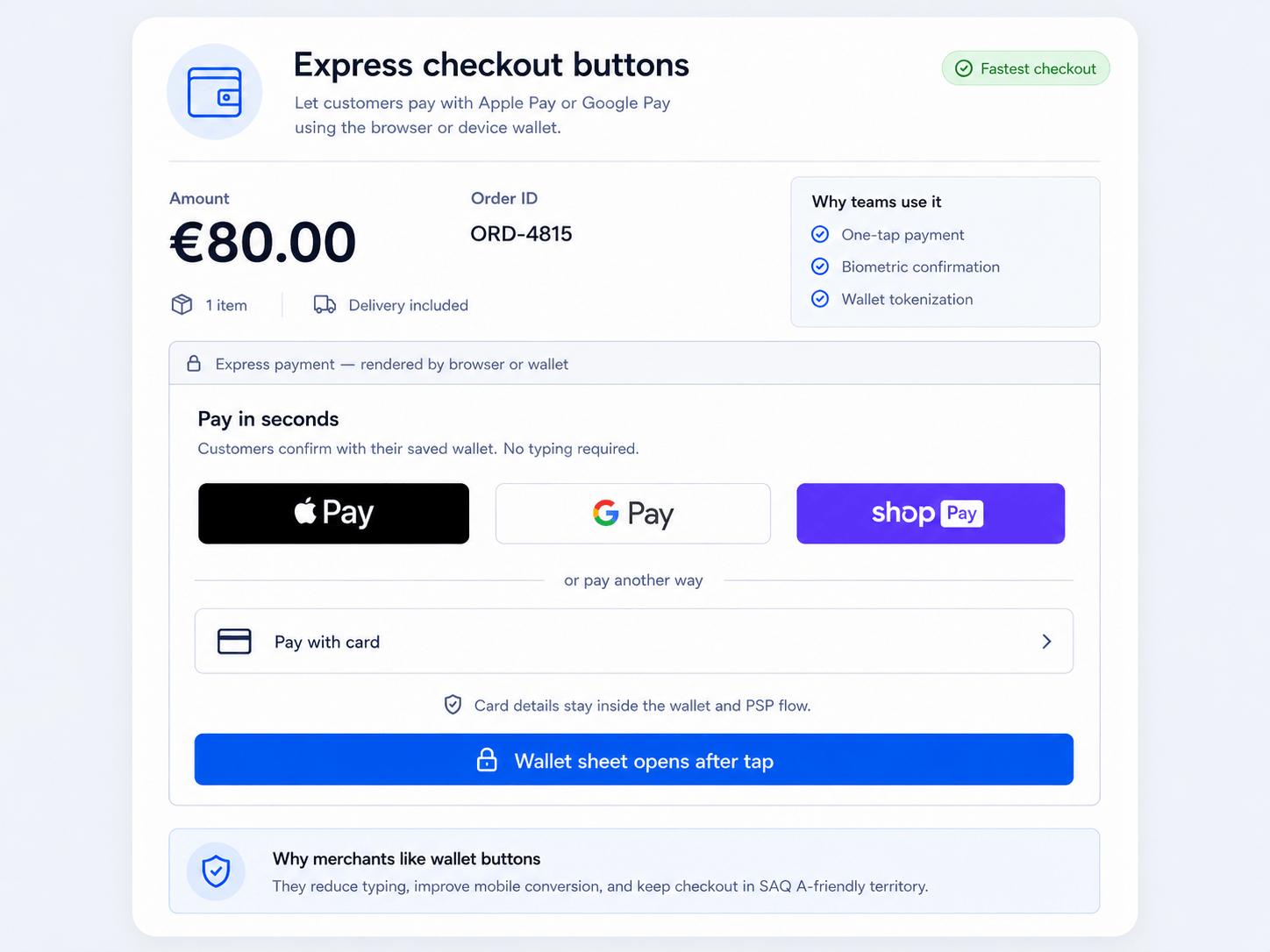
Why it exists: the highest-converting option on mobile — no typing, a built-in second factor, SAQ A. As noted in Layer 3, wallets are cards in disguise, so to your backend this looks much like a card token.
Direct API / raw fields
You build your own <input> elements and the card data is posted to your server (or a form you fully control) before going to the PSP. You get total control — and pay for it with SAQ A-EP or SAQ D, the heaviest compliance burden in the standard. Almost no one should choose this unless they have a strong, specific reason.
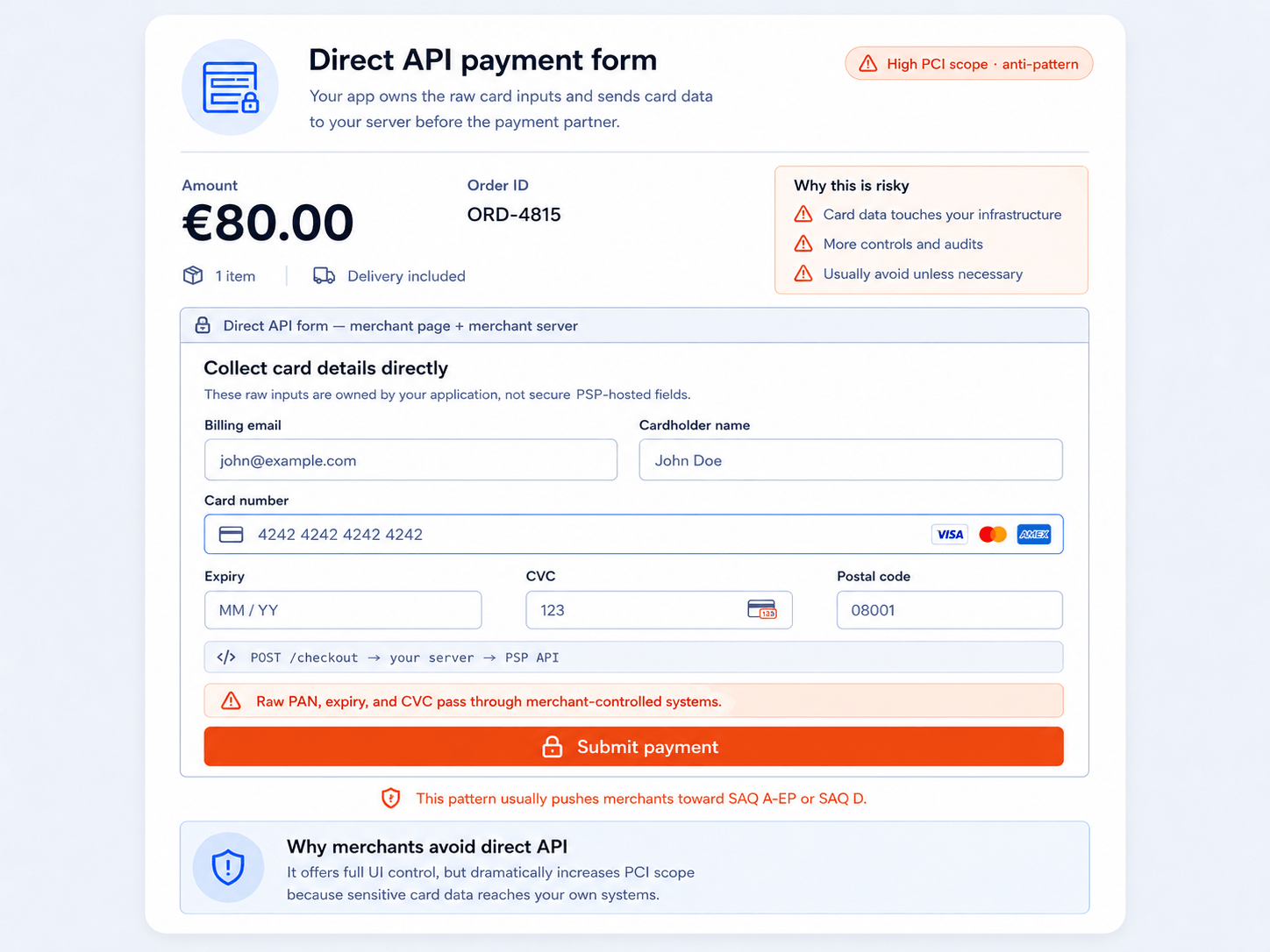
Why it (still) exists: total control, custom flows, or routing across multiple processors — for organizations willing to run a full PCI program.
How iframed fields actually work under the hood
Full-page iframes, drop-in widgets, and hosted fields all rest on the same browser mechanism. It's worth understanding once.
- The PSP's JS injects iframes from its own origin. You load a small script from the PSP. It creates the
<iframe>(s) pointing at the PSP's domain and slots them into your page. The inputs look like part of your form, but each lives onpsp.com, not your origin. - The same-origin policy isolates them. Because the iframe is cross-origin, your JavaScript cannot read its DOM, its value, or its keystrokes — and the iframe can't read yours. This isolation is the whole point: the PAN is unreachable from your code, your logs, and your servers.
- You style via a config API, not CSS. Since you can't reach into the iframe, the PSP exposes a styling/options object (fonts, colors, placeholder) that it applies inside the iframe for you. That's why hosted fields look native even though you can't script their contents.
- Submission is a
postMessagehandshake. When the customer clicks Pay, your code calls something likeconfirmPayment()/tokenize(). The PSP's parent-page JS messages the iframes viapostMessage; the iframes send the PAN directly to the PSP over HTTPS; the PSP returns a token to your page viapostMessage. You forward that token to your server.
Why iframes, specifically? The cross-origin
<iframe>is the mechanism that puts the input on the PSP's domain while it still appears on your page. That domain boundary is exactly what keeps the raw card number out of your DOM, your JavaScript, your logs, and your servers — which is what collapses your PCI scope down to SAQ A.
Picking a point on the dial
There is no single "best" integration — there's a dial. Payment links and redirects give you SAQ A for almost no effort but little control; drop-in widgets are the pragmatic default for most teams; hosted fields buy maximum UX control while staying SAQ A; direct API unlocks full control at full compliance cost. Redirects and iframes are just the levers that let you choose.
Layer 3 — Methods & rails: what the customer is paying with
So far this guide has quietly assumed a card. Layer 3 — the last of the three — is about everything the customer might actually use to pay, and why that choice matters to you. Cards are not the only way money moves, and increasingly not the default: each method has different speed, cost, and reversibility.
| Method | Rail | Speed of finality | Reversible by customer? | Notes |
|---|---|---|---|---|
| Cards | Visa / Mastercard / etc. | Auth instant, settle days | Universal; highest fraud/dispute surface | |
| Wallets | Apple Pay / Google Pay | Same as cards (wraps a card) | Same as cards | Tokenized card + biometric; great UX |
| Bank transfer / debit | SEPA, ACH, iDEAL, Pix… | Slow to instant (varies) | Cheaper; "push" or "pull" from bank | |
| BNPL | Klarna, Afterpay… | Merchant paid upfront | Varies | Provider takes the credit risk |
Wallets are cards in disguise. Apple Pay and Google Pay don't replace the card rails — they wrap a tokenized card and add biometric confirmation. To your PSP integration they look much like a card payment, but with better conversion and a built-in second factor.
"Push" vs "pull". Cards are pull — you request money from the customer's bank. Many bank transfers are push — the customer's bank sends money to you. Push rails have far fewer chargebacks (the customer initiated it), which is why account-to-account methods are growing.
"Mostly no" has a big exception: pull-based direct debits. The reversibility above holds for push transfers (iDEAL, Pix) — once sent, they're final. But pull bank debits are different: SEPA Direct Debit lets the payer reverse the payment for 8 weeks no-questions-asked (up to 13 months if unauthorized), and ACH debits have their own return/dispute windows. So a direct debit can be clawed back much like a card — don't treat every "bank transfer" as final.
Operational layer: living with payments in production
The three layers get a payment to succeed. This section is about everything that happens after that — and it's where most of the real engineering time actually goes. Getting a charge to succeed is the easy part; running payments in production means handling the messy aftermath: money that arrives in batches, disputes, retries, and fees.
Reconciliation: making the numbers match
Reconciliation is the process of confirming that three independent records agree:
These three rarely line up on first glance, because:
- Payouts are netted — a single deposit bundles many sales minus refunds, chargebacks, and fees.
- Timing differs — a sale on Monday may settle in a payout on Wednesday.
- Fees are deducted — you captured €100 but €97.10 lands.
- FX (foreign exchange) — a sale in one currency, a payout in another, at a rate that moved.
Reconciliation is where bugs and fraud surface. A capture with no matching payout, a payout with no matching sale, or fees that don't add up are exactly how you catch double-charges, missed refunds, integration bugs, and outright fraud. Automating the three-way match (internal ledger ↔ PSP report ↔ bank deposit) is core financial hygiene, not an afterthought.
Disputes and chargebacks
A chargeback is the customer disputing a charge with their own bank, which forcibly pulls the money back from you — plus a fee — often months later.
Chargebacks are expensive even when you win. You pay a dispute fee regardless, and too high a chargeback ratio can get your account terminated. The best defenses are upstream: 3DS liability shift, clear billing descriptors, good fraud screening, and easy refunds (a refund is far cheaper than a chargeback).
Webhooks and idempotency
Payments are asynchronous. The synchronous API response is a hint; the webhook is the truth.
- Webhooks — the PSP calls your server when the real state changes (
payment_succeeded,payout_paid,charge_disputed). Treat these — verified by signature — as the source of truth, not the browser redirect. - Idempotency keys — networks time out and clients retry. Sending an idempotency key with each request lets the PSP recognise a retry and avoid charging twice.
POST /v1/charges
Idempotency-Key: order_4815-attempt-1     ← retrying with the SAME key is safe;
Authorization: Bearer sk_live_...            the PSP returns the original result,
                                             it does NOT create a second charge
Two rules that prevent most payment incidents. (1) Believe the webhook, not the redirect or the synchronous response. (2) Put an idempotency key on every state-changing request. Skipping either is how stores accidentally double-charge customers or mark unpaid orders as paid.
Fees: what everyone takes
The headline rate hides a stack:
| Fee | Goes to | Roughly |
|---|---|---|
| Interchange | Issuer | The largest part; set by the networks |
| Scheme fee | Card network | Smaller; for using the rails |
| Markup | PSP / acquirer | The processor's own cut |
Blended vs interchange++. Simple PSPs quote one blended rate (e.g. 2.9% + 30¢). Larger merchants negotiate interchange++, paying the real interchange + scheme fee + a transparent markup — usually cheaper at volume, but harder to predict and reconcile.
A worked example: a two-step card checkout with hosted fields
Advanced — more detailed than the rest of the guide; safe to skip on a first read.
To see the three layers click together, here's how a typical physical-goods store wires them up. It collects the card with iframed hosted fields (Layer 2), uses auth-then-capture so it only takes money when it ships (Layer 1), pays over the card rails (Layer 3), and confirms everything via webhooks (operational).
TL;DR
- The card number is typed into the PSP's iframe, never your servers → you stay in SAQ A.
- You authorize at checkout (reserve the funds) but capture only when you ship.
- The browser response is a hint; the webhook is the truth, and an idempotency key stops double charges.
- Days later, the money arrives as a netted payout that you reconcile against your ledger.
Step by step
- Collect (Layer 2). Hosted fields keep the PAN on the PSP's domain; you receive a token.
- Authorize (Layer 1). Reserve €80 at checkout — you know the funds are good, but take nothing yet.
- Capture on ship (Layer 1). The final basket is €72, so you partial-capture €72 and let the rest of the hold fall away.
- Confirm via webhook (operational). Mark the order paid only when the signed
payment_succeededwebhook arrives — not on the browser redirect. - Reconcile (operational). Days later, a single €69.81 payout lands — €72 minus fees — bundled with other orders. You three-way match it before calling the money real.
Stripped to its essence, the server side of that flow is just three handlers — authorize, capture, and a webhook — held together by an idempotency key:
// 1) At checkout: the browser already swapped the card for a `token`.
//    Authorize — reserve the funds, take nothing yet.
function placeOrder(token, basket) {
  const auth = psp.authorize(
    { amount: basket.estimatedTotal, token, capture: false, threeDSecure: "required" },
    { idempotencyKey: `auth-${basket.orderId}` }, // retry-safe: never double-authorizes
  );
  orders.save({ id: basket.orderId, authId: auth.id, status: "authorized" });
}

// 2) When the warehouse ships: capture what you're actually owed (maybe less).
function onShipped(order) {
  psp.capture(
    order.authId,
    { amount: order.finalTotal },                 // €72.00 — a partial capture
    { idempotencyKey: `capture-${order.id}` },
  );
  // NOTE: don't mark the order paid here — wait for the webhook.
}

// 3) The PSP calls this when the money truly moves. This is the source of truth.
function onWebhook(req) {
  if (!psp.verifySignature(req)) return respond(401);
  if (req.event === "payment_succeeded") {
    orders.markPaid(req.data.orderId);            // idempotent: a no-op if already paid
  }
}
The store never sees a raw card number, never takes money it hasn't earned, never double-charges on a retry, and never trusts a number until it's reconciled. That's all three layers plus the operational discipline working together.
Final mental model
A payment is not one thing. It's a stack:
Or even simpler:
Authorization = Can I have the money? (hold)
Capture       = Take the money now.
Settlement    = The banks actually move it.
Payout        = It shows up in my account, minus fees.
Reconciliation = Prove all of the above agrees.
And the one decision that shapes everything else:
How does the card number reach the processor? Redirect or iframe → tiny PCI scope. Your own servers → enormous PCI scope. Choose the integration model first; almost everything else follows from it.
The direction of travel is less raw card data and more delegation: hosted fields and wallets instead of homegrown forms, tokenization instead of stored PANs, 3DS/SCA instead of trusting the card alone, and account-to-account "push" rails chipping away at the card's dominance.
The key idea:
Good payment engineering is not only about getting a charge to succeed. It's about reserving correctly, touching card data as little as possible, confirming asynchronously, and proving — through reconciliation — that the money really moved.
Glossary
| Term | What it is |
|---|---|
| Authorization | A hold reserving funds; no money moves yet |
| Capture | The step that actually charges the reserved funds |
| Sale | Authorize + capture in one step |
| Void | Cancelling an authorization before it settles |
| Refund | A new transaction returning already-settled money |
| Clearing | Batching captured transactions for the networks |
| Settlement | Funds actually moving between banks |
| Payout | Net funds landing in the merchant's bank account |
| Reconciliation | Matching ledger ↔ PSP report ↔ bank deposit |
| Chargeback | Customer-initiated forced reversal via their issuer |
| PCI DSS | Security standard for handling card data |
| SAQ | Self-Assessment Questionnaire proving PCI compliance |
| PAN | The card's long Primary Account Number |
| Tokenization | Replacing a card number with an opaque reference |
| Hosted fields | Card inputs rendered as PSP-owned cross-origin iframes |
| 3D Secure (3DS) | Issuer-side cardholder authentication step |
| SCA | EU/UK Strong Customer Authentication requirement |
| Acquirer | The merchant's bank |
| Issuer | The cardholder's bank |
| Gateway / PSP | Payment Service Provider — the payment tech layer you integrate with |
| Interchange | The fee paid to the issuing bank |
| Idempotency key | A key that makes a retried request safe from double-charging |
| BNPL | Buy Now, Pay Later — the provider pays you upfront and takes the credit risk |
| SEPA | Single Euro Payments Area — euro bank-transfer/direct-debit rails |
| ACH | Automated Clearing House — US bank-transfer rails |
| FX | Foreign exchange — currency conversion between sale and payout |
References
- PCI Security Standards Council — the body behind PCI DSS, the standard for handling card data.
- EMV 3-D Secure — EMVCo — the specification behind issuer-side 3DS cardholder authentication.
- Stripe Payments documentation — a primary reference for integrating card payments, tokenization, and SCA.