

Your .zshrc started as ten tidy lines and has quietly become a 400-line dumping ground of half-remembered aliases, dead exports, and copy-pasted snippets you're afraid to delete. Here's how to clean it up and keep it that way.
The junk drawer
If you use zsh, sooner or later your ~/.zshrc becomes a mess.
At first it starts innocently:
alias ll="ls -la"
Then you add Git aliases. Then Homebrew setup. Then some Node stuff. Then a few shell functions. Then a random PATH fix you copied from Stack Overflow. Then something for Python, something for Docker, something for completions, something you no longer understand but are afraid to delete.
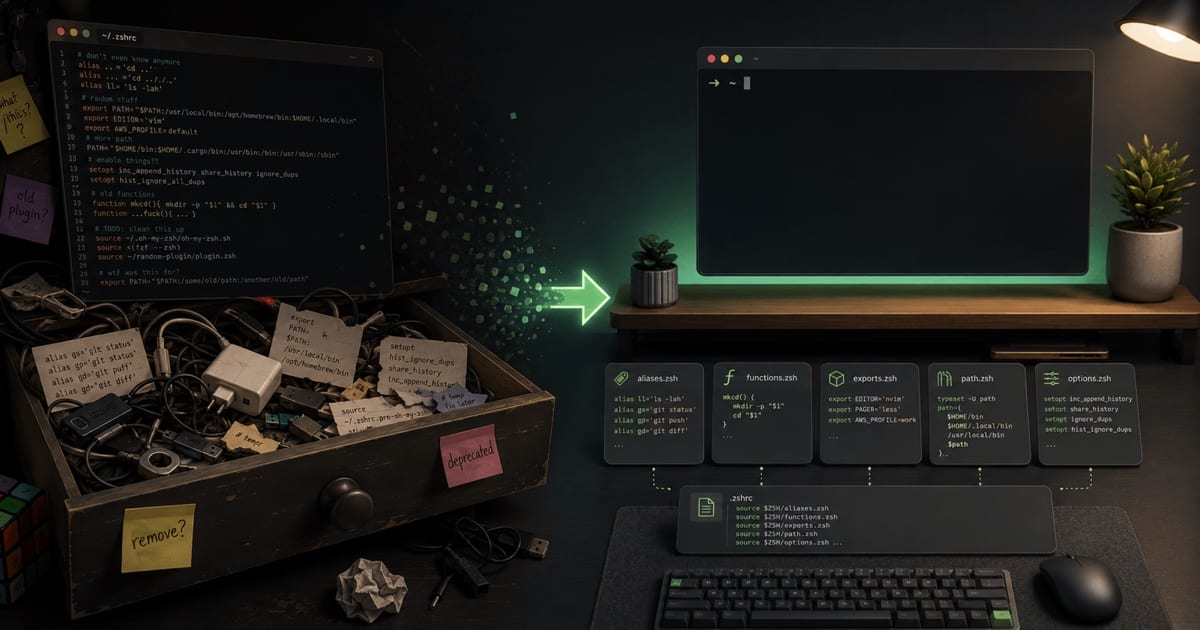
Six months later, opening .zshrc feels like opening a drawer full of cables.
Know which file loads when
Before splitting anything, it helps to know that zsh doesn't read one config file — it reads a few, each at a different moment. Think of them as doors your shell passes through, from outermost to innermost:
| File | Loaded when… | What belongs here |
|---|---|---|
~/.zshenv | Always — every zsh, even scripts | Almost nothing — keep it empty |
~/.zprofile | You start a login shell (macOS Terminal) | Environment: PATH, brew, EDITOR |
~/.zshrc | You open an interactive terminal | Comfort: aliases, prompt, plugins |
For most people that shakes out to:
~/.zshenv→ empty~/.zprofile→ Homebrew +PATH+EDITOR~/.zshrc→ aliases + prompt + plugins
Keep ~/.zshenv almost empty — most "why is my PATH weird?" problems come from cramming things in there.
Split your .zshrc into modules
.zshrc is the door that grows fastest, so it's the one worth splitting. A cleaner approach is to break your shell config into smaller files.
The idea is simple:
~/.zprofile
~/.zshrc
~/.config/zsh/
  aliases.zsh
  functions.zsh
  exports.zsh
  path.zsh
  options.zsh
Why ~/.config/zsh/? That's the XDG Base Directory convention — the standard ~/.config folder where modern tools keep their settings, so your home directory doesn't collect a dozen loose dotfiles. One caveat: zsh still reads its startup files (.zshenv, .zprofile, .zshrc) from your home directory — that path is fixed unless you set ZDOTDIR. The module files, though, are yours: nothing loads them automatically, so you decide where they live and source them by path. ~/.config/zsh/ is just a tidy home for them.
~/.zprofile is for login-shell environment setup. For example, Homebrew on macOS usually belongs there:
eval "$(/opt/homebrew/bin/brew shellenv)"
That is not really an alias. It is not a function. It is not a prompt customization. It is environment setup, so .zprofile is the right place.
Then ~/.zshrc becomes the entrypoint for your interactive shell. Instead of containing everything directly, it just loads the smaller files:
ZSH_CONFIG="$HOME/.config/zsh"

source "$ZSH_CONFIG/options.zsh"
source "$ZSH_CONFIG/path.zsh"
source "$ZSH_CONFIG/exports.zsh"
source "$ZSH_CONFIG/aliases.zsh"
source "$ZSH_CONFIG/functions.zsh"
Or, slightly safer:
ZSH_CONFIG="$HOME/.config/zsh"

for file in options path exports aliases functions; do
  [ -f "$ZSH_CONFIG/$file.zsh" ] && source "$ZSH_CONFIG/$file.zsh"
done
Visually, the two entrypoints load different things:
Now each file has a clear job.
aliases.zsh is for simple shortcuts:
alias ll="ls -la"
alias gs="git status"
alias gp="git pull"
alias c="clear"
Aliases should stay dumb. If you need arguments, conditions, or multiple commands, use a function instead.
functions.zsh is for small bits of reusable logic:
mkcd() {
  mkdir -p "$1" && cd "$1"
}

serve() {
  python3 -m http.server "${1:-8000}"
}
exports.zsh is for environment variables:
export EDITOR="nvim"
export VISUAL="nvim"
export LANG="en_US.UTF-8"
path.zsh is for manual PATH changes:
export PATH="$HOME/.local/bin:$PATH"
export PATH="$HOME/bin:$PATH"
Strictly speaking, PATH and environment variables are login-shell concerns, so purists put them straight in .zprofile (see the table above). Sourcing exports.zsh and path.zsh from .zshrc keeps every module in one place — the tradeoff is they re-run on each interactive shell. Either works; just don't define the same thing in both.
And options.zsh is for zsh behavior:
setopt AUTO_CD
setopt HIST_IGNORE_DUPS
setopt SHARE_HISTORY

HISTFILE="$HOME/.zsh_history"
HISTSIZE=10000
SAVEHIST=10000
Why it helps
The benefit is not that this is “more advanced”. It is the opposite: it makes the setup boring and understandable.
When I want to add a shortcut, I know where it goes.
When I want to change shell behavior, I know where it goes.
When something breaks, I do not have to scan a giant .zshrc full of unrelated things.
The mental model is:
| File / module | Responsibility |
|---|---|
.zshenv | Always loaded — keep empty |
.zprofile | Login environment |
.zshrc | Interactive shell entrypoint |
aliases.zsh | Simple shortcuts |
functions.zsh | Small scripts |
exports.zsh | Environment variables |
path.zsh | PATH additions |
options.zsh | zsh behavior |
Start small
You do not need to over-engineer this. Start with just:
aliases.zsh
functions.zsh
exports.zsh
That is already enough to stop .zshrc from becoming a dumping ground.
The goal is not to create the perfect shell framework. The goal is to make your terminal config easy to read, easy to change, and easy to delete without fear.
References
- Zsh manual — official documentation, including startup files and
setoptoptions - XDG Base Directory Specification — the standard behind
~/.config
Related: The Right Terminal Stack for a Developer — where the shell fits alongside the emulator, prompt, and plugin manager. And Managing dotfiles with chezmoi — once .zshrc is tidy, version it across machines.