
The first load of a Next.js app is a document — HTML down the wire, parsed, hydrated. But once the app is interactive, open your Network tab and you'll notice it never asks for a document again. Instead you see a trickle of odd little requests: some are GETs that return something that isn't HTML, and some are POSTs to the page you're already on, streaming a response back. Those POSTs are the part that looks weird, and they're the reason this post exists.
This is the sequel to From URL bar to interactive, which walked the cold boot up to the moment the page becomes clickable. Here we pick up right after hydration and map the entire way a live App Router app talks to its server — the reads, the writes, the hooks that wrap them, what happens without JavaScript, and why every one of those POSTs is quietly a public endpoint you're responsible for.
The one idea everything hangs off
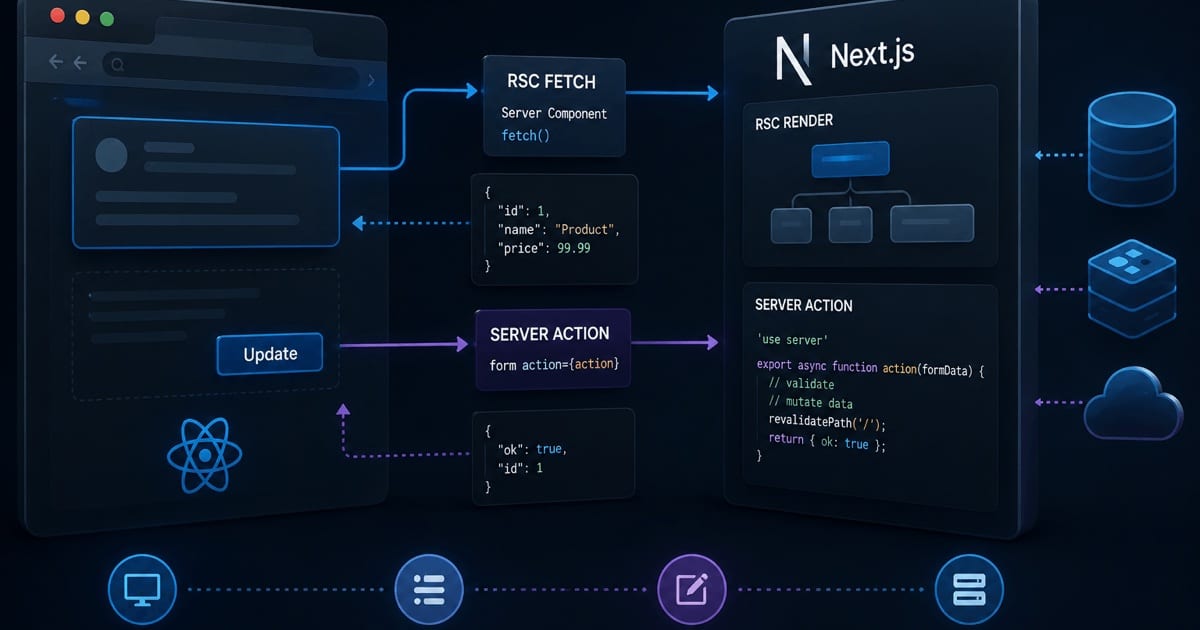
After hydration, a running App Router app never fetches an HTML document again — short of a hard navigation (a full page reload or an external link), which simply restarts the whole boot sequence from the last post. Every ordinary in-app move instead speaks the same wire format from the boot post's Part 5 — the React Server Components (RSC) payload (React's "Flight" serialization) — carried over HTTP in exactly two verbs:
| Verb | What it is | Method | Comes back as |
|---|---|---|---|
| Read | Navigate, prefetch, or refresh a route | GET | A streamed RSC payload for the changed segments |
| Write | Run a mutation (a Server Action) | POST | A streamed RSC payload: the return value + any re-rendered UI |
Both directions speak the same Flight protocol; the only real difference is the HTTP method and whether the request carries a body. Hold onto that — the rest of the post is just filling in the two rows.
What is "Flight"? Flight is the internal name for React Server Components' wire format — the way React serializes a rendered component tree (and, for actions, arguments and return values) so it can travel over the network. It isn't HTML and it isn't JSON: it's a line-oriented stream of numbered rows,
id:payload, where later rows reference earlier ones ($1), point at Client Component chunks by module ID (I["/_next/…",[…]]), or stand in for values still streaming ($@1= a pending promise). It's deliberately for the React runtime to parse, not for humans to read — which is exactly why it looks like obfuscated line-noise in DevTools.text/x-componentis its MIME type. When this post says "RSC payload," it means a Flight stream.
A single row from a Flight stream looks like this — one server-rendered div wrapping a lazy reference to a Client Component defined in another row:
3:["$","div",null,{"className":"card","children":["$","$L4",null,{"count":3}]}]
4:I["/_next/static/chunks/counter-a1b2.js",["Counter"]]
Row 3 is plain server output; the $L4 is a placeholder saying "a Client Component sits here, its code is described in row 4." That reference-by-ID trick is the whole reason Server and Client Components can interleave in one payload.
Here's the whole surface in one table, which we'll unpack piece by piece:
| Dimension | Navigation / prefetch (read) | Server Action (write) |
|---|---|---|
| Method | GET | POST |
| Trigger | <Link>, router.push(), router.refresh(), prefetch | <form action>, startTransition, an imported 'use server' call |
| URL | The destination route | The current page URL |
| Key header | RSC: 1 (+ Next-Router-State-Tree) | Next-Action: <hashed-id> |
| Body | None | Serialized arguments |
| Response | text/x-component, streamed | text/x-component, streamed |
Part 1 — The read path (GET)
When the app needs data or a new screen, it does a fetch — not for a page, but for a payload.
A navigation is a GET for a payload, not a page
Click a <Link> (or call router.push()), and the client router issues a GET to the destination route with a header that changes everything: RSC: 1. That header tells the server "don't render a document — render the Flight payload." Next also sends Next-Router-State-Tree, a serialized snapshot of what the client currently has mounted, so the server can compute only what changed. The response comes back as Content-Type: text/x-component, streamed.
GET /dashboard/settings                ← the DESTINATION route
RSC: 1                                 ← "send the Flight payload, not a document"
Next-Router-State-Tree: %5B%22%22%2C…  ← URL-encoded snapshot of the client's current tree

→ 200  Content-Type: text/x-component  (streamed, chunked)
   2:I["/_next/static/chunks/settings-9f2a.js",["SettingsForm"]]
   0:["$","div",null,{"children":["$","$L2",null,{}]}]   ← only the changed segment
Notice what's not there: no <!doctype html>, no <head>, no framework <script> tags. It's the same numbered-row Flight format from the boot post's Part 5 — just the segments that differ, ready to reconcile.
Partial rendering: only the changed segments
Because the server was told your current tree — in that Next-Router-State-Tree header, on this request — it can re-render and return only the route segments that actually differ. Navigate between two pages that share a layout and the layout is neither re-fetched nor re-rendered — it stays mounted, and only the inner segment is swapped. This is the App Router's answer to "why isn't this a full page load."
Wait — if HTTP is stateless, how does the server "know" the tree?
It doesn't. Nothing on the server remembers you between requests, and that's the whole point. There's no per-user server instance, no in-memory session tree, no sticky connection — the server holds zero state about your app.
What actually happens is that the client is the source of truth, and it re-sends the state it needs on every request. The Next-Router-State-Tree header is the current tree, serialized and attached to that one GET. The server reads it, computes the diff, renders the changed segments, and then forgets everything. The next request carries its own fresh copy.
This is exactly why it's fast and scalable, not in spite of it:
| If the server kept your tree in memory… | Because it's stateless instead… |
|---|---|
The cost is that the client re-uploads its router state on each navigation — a few hundred bytes of header — which is a cheap price for a server that never has to remember anyone. (The client-side Router Cache from the boot post is the client's memory; the server keeps none.)
Prefetching: the payload is usually already here
As a <Link> scrolls into viewport, Next prefetches the destination's payload at low priority (the request carries Next-Router-Prefetch: 1). Static routes prefetch in full; dynamic routes prefetch up to the nearest loading boundary, so at least the shell is instant. You can force or disable this with the prefetch prop. This is why most in-app navigations feel like there was no network at all — because, on a cache hit, there wasn't.
GET /dashboard/settings                ← fired on hover / into-viewport, not on click
RSC: 1
Next-Router-Prefetch: 1                ← "just the prefetchable shell, low priority"
Next-Router-State-Tree: %5B%22%22%2C…

→ 200  Content-Type: text/x-component  (cached in the Router Cache for the real click)
The only difference from a real navigation is the extra Next-Router-Prefetch: 1 header — same URL, same method. When you actually click, the payload is already sitting in the client cache.
router.refresh(): re-read the current route, keep your state
There's a third read that isn't a navigation. router.refresh() refetches the RSC payload for the route you're already on, discards the client-side Router Cache for it, and reconciles the fresh server render into the tree — without losing client React state (form inputs, useState, scroll). It's how you pull fresh server data after something changed out of band. It's a GET RSC fetch pointed at the present instead of a destination.
GET /dashboard/settings                ← the route you're ALREADY on
RSC: 1
Next-Router-State-Tree: %5B%22%22%2C…

→ 200  Content-Type: text/x-component  (fresh render; client state is preserved on reconcile)
On the wire it's indistinguishable from a navigation to the same URL — the difference is entirely client-side: the router keeps your mounted React state and just swaps the server-rendered parts underneath it.
The Router Cache decides whether any of these reads touch the network at all — the rule is simply fresh cache → no request, otherwise ask the server. The boot post's navigation appendix has the full hit/miss flowchart; I won't repeat it here.
Part 2 — The write path: Server Actions over the wire
Now the requests that prompted this post. A Server Action is an async function marked 'use server' that runs on the server but is called from the client as if it were local. Under the hood, that call is an HTTP POST — and its anatomy is specific.
Anatomy of the POST
POST /dashboard/settings            ← the CURRENT page URL, not /api/anything
Next-Action: 7f9c1a…                ← hashed ID of the 'use server' function to run
Content-Type: text/plain            ← or multipart/form-data (see below)

[serialized arguments]              ← the body: the action's args, Flight-encoded
Four things worth naming:
- It POSTs to the page you're on. There's no REST endpoint, no
/apiroute. The action is bound to the route it was defined in; Next routes the request by inspecting theNext-Actionheader, not the path. Next-Actionis the dispatch key. It's a non-guessable hash that identifies which server function to invoke. (More on why that hash matters in Part 5.)- The body carries the arguments. Plain JS arguments are Flight-encoded as
text/plain. The moment aFormDataorFileis involved — the<form action={…}>case — the body switches tomultipart/form-dataso binary uploads ride along. - The response streams back as
text/x-component— the same Flight format as every read.
What it actually looks like in DevTools
The block above is cleaned up. Here's the real thing. Say you call updateProfile("Ada Lovelace", true) from a button — the request Next fires is:
POST /dashboard/settings HTTP/2
accept: text/x-component
next-action: 40a1f2c9d7e3b6c8a5019f2e7d          ← the action's build-time hash
content-type: text/plain;charset=UTF-8

["Ada Lovelace",true]                             ← the arguments array, Flight-encoded
For a <form action={…}> submit the body is multipart/form-data instead, and it gets stranger — React encodes the arguments as boundary-separated fields with N_-prefixed names and a reference row:
POST /dashboard/settings HTTP/2
next-action: 40a1f2c9d7e3b6c8a5019f2e7d
content-type: multipart/form-data; boundary=----WebKitFormBoundaryK9c

------WebKitFormBoundaryK9c
Content-Disposition: form-data; name="1_name"

Ada Lovelace
------WebKitFormBoundaryK9c
Content-Disposition: form-data; name="1_email"

ada@analytical.engine
------WebKitFormBoundaryK9c
Content-Disposition: form-data; name="0"

["$K1"]                                            ← "arg 0 = reconstruct FormData from the 1_* fields"
------WebKitFormBoundaryK9c--
The response is the part that really looks like line-noise. It's a streamed sequence of numbered Flight rows — and because it streams, they can arrive out of numeric order:
→ 200  content-type: text/x-component

0:{"a":"$@1","f":[],"b":"K3n7p2Q..."}   ← action-result envelope: a→return value, f→form state, b→build id
2:I["/_next/static/chunks/app/dashboard/page-8c2f.js",["default"]]  ← a Client Component chunk
1:{"ok":true,"id":42}                    ← your action's ACTUAL return value (resolves the $@1 above)
3:["$","$L2",null,{"user":"$4"}]         ← the re-rendered segment (because the action revalidated)
4:{"name":"Ada Lovelace","subscribed":true}   ← data referenced by row 3
Decoding the markers that make it look obfuscated:
| Token | Meaning |
|---|---|
0: … 4: | Row IDs — each line is id:payload, and rows reference each other by ID |
$@1 | A pending promise, resolved by the row with that ID (here, row 1 = the return value) |
$L2 | A lazy Client Component reference — its module lives in row 2 |
I["/_next/…",["default"]] | A client module import — chunk URL + the export(s) to load |
$4 | A plain reference to the value serialized in row 4 |
These exact field names (
a/f/b) and tokens are React/Next internals and shift between versions — don't parse them by hand. What's stable, and worth recognizing, is the shape: an envelope, your return value, then re-rendered rows.
One round-trip, two things come back
This is the elegant part, and the reason the response streams. A single Server Action POST returns a payload that multiplexes two things at once:
| In the streamed response | What it is |
|---|---|
| The return value | Whatever your action returned — a result object, a status, an error shape |
| The re-rendered UI | If the action called revalidatePath / revalidateTag (or the route re-renders), a fresh RSC render of the affected segments |
So a mutation and the UI refresh that reflects it arrive in one round-trip. The client reconciles the fresh segments against the current tree using the exact diffing machinery from the boot post's Part 5 — only changed subtrees are swapped in the DOM, already-downloaded Client Component chunks are reused, and nothing that didn't change re-hydrates. You mutate and get the updated screen back in a single streamed POST, with no separate refetch.
Redirects and ordering
Two behaviors round out the write path:
redirect()inside an action doesn't send an HTTP 3xx. It returns a special Flight instruction in the stream that tells the client router to navigate — which then follows the read path above.- Actions are dispatched serially. React queues action dispatches and applies their results in order, so a burst of mutations can't interleave into an inconsistent UI — a meaningful contrast with firing parallel
fetches and racing their responses.
Part 3 — The hooks that wrap the round-trip
You rarely touch the POST directly. Three React hooks map onto the phases of that round-trip, and knowing which phase each one owns is most of the mental model:
| Hook | Phase it owns | Gives you |
|---|---|---|
useActionState | The whole call | The action's latest return value + a pending flag |
useFormStatus | In-flight, inside a <form> | The pending state for descendants (e.g. a submit button) |
useOptimistic | Before the response lands | A temporary optimistic state shown while the POST is in flight |
The pattern that ties them together: useOptimistic paints the expected result the instant you submit (the POST hasn't returned yet), useFormStatus disables the button while it's in flight, and useActionState hands you the real return value — and the reconciled fresh UI — when the stream resolves. If the action failed, its returned error shape flows back through useActionState and you swap the optimistic value for the truth.
Naming note:
useActionStateis the current hook (React 19 / recent Next). You'll still seeuseFormStatein older code and posts — same idea, renamed.
Part 4 — It still works without JavaScript
Here's the property that makes Server Actions more than a fancy fetch. Wire one to a form:
async function subscribe(formData: FormData) {
  'use server';
  await db.subscribe(formData.get('email'));
}

// in a Server Component
<form action={subscribe}>
  <input name="email" type="email" />
  <button>Subscribe</button>
</form>
Before any JavaScript has hydrated — or with JS disabled entirely — that form is a plain HTML form. Submitting it does a native browser POST to the same URL, the server runs the action, and returns HTML. The feature degrades to the oldest mechanism on the web.
Once the page hydrates, the client router intercepts the submit and turns it into the streamed Flight POST from Part 2 instead — no full navigation, optimistic updates available, the UI patched in place. Same endpoint, same action, two delivery mechanisms: progressive enhancement is the default, not an add-on.
Part 5 — Every Server Action is a public endpoint
This is the part most tutorials skip, and it's the one with real consequences. That Next-Action POST is reachable by anyone — it's an HTTP endpoint like any other. Next builds several protections around it:
| Protection | What it does |
|---|---|
| Hashed action IDs | Actions are addressed by a non-guessable hash, not a readable route — no discoverable URL |
| Dead-code elimination | Actions never referenced by any client bundle are stripped, so they can't be invoked |
| Encrypted closures | Variables an inline action closes over are encrypted with a per-build key before being sent to the client, so bound values can't be read or tampered with |
| CSRF (Cross-Site Request Forgery) defense | Actions are POST-only and Next verifies the Origin against the Host header, rejecting cross-site mismatches |
But — and this is the takeaway — none of that authenticates or authorizes the caller. A valid, logged-in-elsewhere user (or a crafted request) can still hit the endpoint. So the rule is blunt:
Treat every Server Action like a public API route: authenticate the session and authorize the operation inside the action body, on every action, every time. The hashing and encryption protect the plumbing, not your data.
Part 6 — When it's not an action: Route Handlers
Server Actions are the mutation path for your own UI. When you need a real, addressable HTTP endpoint, you drop to a Route Handler (route.ts). The line between the three server-touch options:
| You need… | Use | Shape |
|---|---|---|
| To read data for a page | Server Component | async component; runs on the server, ships HTML |
| To mutate from your own UI | Server Action | 'use server' fn; POST + streamed Flight; progressive enhancement |
| A public / stable HTTP endpoint | Route Handler | route.ts; classic Request → Response at a fixed URL |
Reach for a Route Handler when the consumer isn't your React tree: webhooks, a mobile or third-party client calling a stable URL, custom streaming/binary responses, or anything that must be a plain fetch target. Everything else — the day-to-day form submits and writes — is a Server Action, and you get the single-round-trip refresh and progressive enhancement for free.
The whole thing in one breath
- After hydration the app stops fetching documents — every server call is the RSC/Flight payload over HTTP.
- Reads are GETs: navigation, prefetch, and
router.refresh()sendRSC: 1+ the current tree, and get back a streamed payload for only the changed segments. - Writes are POSTs: a Server Action posts to the current URL with a
Next-Actionheader and serialized args in the body. - One round-trip returns two things: the action's return value and the re-rendered UI (on
revalidate*), reconciled in place with chunk reuse and no full re-hydration. useOptimistic/useFormStatus/useActionStatewrap the phases of that round-trip;redirect()rides back as a Flight instruction; actions run serially.- It degrades gracefully: a form action is a native POST without JS, an intercepted Flight POST with it.
- Every action is a public endpoint — the framework hardens the plumbing, but you authenticate and authorize inside every action.
- When you need a stable, external HTTP endpoint, that's a Route Handler, not an action.
The mental model that makes all of it click: a running Next.js app has just two things to say to its server — "show me this" and "do this" — and it says both in the same streamed Flight dialect, differing only by GET versus POST. The boot sequence gets you a live page; this is the conversation that page has for the rest of its life.
References
- Next.js —
use serverdirective — Server Actions, their POST anatomy, and security. - React — Server Components — the server-rendered tree behind the RSC/Flight payload.
- React — Server Functions — the write path (formerly "Server Actions") and its hooks.
- Next.js Documentation — the App Router, Route Handlers, and data fetching.