
Authentication sounds scary until you look at it from the top down: who are you, how do you prove it, and how does the app remember you. This guide builds that mental model one layer at a time.
Authentication answers one question:
Are you really who you claim to be?
That sounds simple, but authentication is actually a stack of different ideas: passwords, SMS codes, biometrics, passkeys, login sessions, OAuth, SSO, cookies, tokens, and more.
Authentication vs authorization. Authentication establishes who you are — it creates an identity. Authorization decides what you may do — it evaluates permissions. They're constantly confused. This guide is about authentication; authorization (roles, scopes, policies) is its own large topic and only appears here where the two touch.
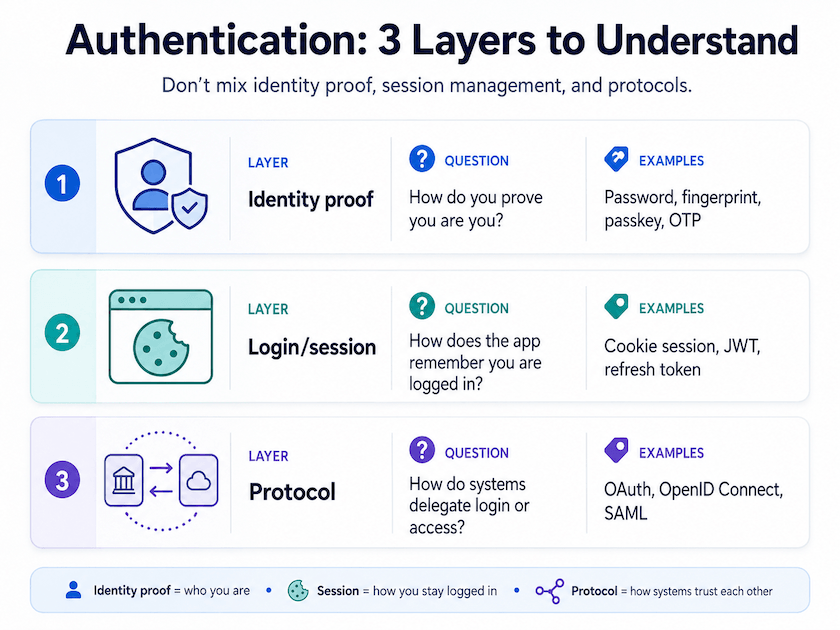
The confusing part is that people often mix three different layers:
| Layer | Question | Examples |
|---|---|---|
| Identity proof | How do you prove you are you? | Password, fingerprint, passkey, OTP |
| Login/session | How does the app remember you are logged in? | Cookie session, JWT, refresh token |
| Delegation protocol | How do systems delegate login or access? | OAuth, OpenID Connect, SAML |
Underneath all three: the wire. Every layer here assumes a secure channel — HTTPS/TLS. Without it, a password, cookie, or token can be read or stolen in transit, and every defense below collapses. On each request the credential rides in an HTTP auth scheme: a cookie, or an
Authorization: Bearer/Basicheader. One method — mTLS (mutual TLS / client certificates) — authenticates at this transport layer itself.
# Basic — credentials base64-encoded in the header (only safe over TLS)
GET /api/me HTTP/1.1
Host: api.example.com
Authorization: Basic cGVyZUBleGFtcGxlLmNvbTpodW50ZXIy

# Bearer — a signed or opaque token
GET /api/me HTTP/1.1
Host: api.example.com
Authorization: Bearer eyJhbGciOiJSUzI1NiJ9.eyJzdWIiOiJ1c2VyXzEyMyJ9...

# Cookie — the browser attaches it automatically
GET /api/me HTTP/1.1
Host: api.example.com
Cookie: sessionId=s%3Aa1b2c3d4...

# mTLS — no auth header; identity is the client certificate at the TLS layer
$ curl --cert client.crt --key client.key https://api.example.com/api/me
mTLS is mostly service-to-service, enterprise, or high-security — you'll rarely wire it up for a consumer web login.
These three layers are the backbone of this guide: the rest of the post is organized around them. Most of what people call "authentication methods" lives in the first layer — Identity proof — so that's where we'll spend most of our time.
So, how many authentication ways are there?
There is no single official number. For web applications, this guide groups the common methods into 7 families: five ways you prove identity directly (Layer 1) plus two ways you delegate it to someone else (Layer 3).
The Big Picture
Layer 1 — Identity proof: how you prove it's you
This is where most authentication methods live. Everything in this layer answers the same question — how do you prove you are really you? — and the five families below are just different ways of doing exactly that.
Password Authentication
This is the classic login:
email + password
Example:
pere@example.com
hunter2
The server checks whether the password matches the user.
Usually, the server does not store the real password. It stores a salted, slow hash of it, using algorithms designed for passwords (e.g. bcrypt, scrypt, Argon2). See OWASP Password Storage.
Pros and cons
| Good | Bad |
|---|---|
| Easy to understand | Users reuse passwords |
| Works everywhere | Passwords can be stolen |
| Cheap to implement | Vulnerable to phishing |
| Familiar UX | Requires reset flows |
In plain terms
A password is like a secret word between you and the website.
Problem: if someone tricks you into saying the secret word, they become you.
Multi-Factor Authentication, MFA
MFA means the user must prove identity with more than one type of evidence.
The common factors are:
| Factor | Meaning | Example |
|---|---|---|
| Something you know | A secret | Password, PIN |
| Something you have | A device | Phone, hardware key |
| Something you are | Body/biometric | Fingerprint, Face ID |
Example:
Password + 6-digit code
Common MFA types
| Type | Example | Security |
|---|---|---|
| SMS code | Code sent by SMS | |
| Email code | Code sent by email | |
| Authenticator app | Google Authenticator, Authy | |
| Push approval | Approve on phone | — but can suffer fatigue attacks |
| Hardware key | YubiKey | |
| Passkey | Device-based cryptographic login |
Is a passkey "MFA"? It can be. A passkey combines possession of the device with local user verification (biometric or device PIN), so a single passkey tap can satisfy two factors at once — though it can also be configured as single-factor.
What is a fatigue attack? A push fatigue attack (also called MFA fatigue or push bombing) happens when an attacker who already has your password spams your phone with login approval prompts — sometimes dozens in a row, often late at night. The goal is annoyance: eventually you tap Approve just to make the buzzing stop, and that single tap hands them access. Defenses include number matching (you must type a code shown on the login screen), rate-limiting prompts, and showing extra context (location, app) on each request.
A note on SMS. SMS codes beat no second factor, but they're the weakest common MFA: not phishing-resistant, and exposed to SIM-swap and network interception. NIST flags OTP-over-SMS as not phishing-resistant (NIST SP 800-63B). Prefer an authenticator app, push with number-matching, or a passkey/hardware key.
In plain terms
MFA is like saying:
“Knowing the secret word is not enough. Show me your key too.”
Passwordless Authentication
Passwordless means the user logs in without typing a password.
Common examples:
| Method | How it works |
|---|---|
| Magic link | Receive a link by email |
| One-time code | Receive a short-lived code |
| Passkey | Use device biometrics/PIN + cryptographic key |
| Social login | Login with Google, Apple, Microsoft, etc. |
Example:
Enter email → receive link → click link → logged in
Pros and cons
| Good | Bad |
|---|---|
| No password to remember | Email account becomes critical |
| Better UX | Magic links can be annoying |
| Reduces password reuse | Requires careful session security |
| Passkeys can be phishing-resistant | Passkeys still need good recovery UX |
In plain terms
Passwordless means:
“Instead of remembering a secret, prove you control something trusted.”
That “something” might be your email inbox, your phone, or your device.
Passkeys / WebAuthn / FIDO2
Passkeys are one of the most important modern authentication methods.
They replace passwords with public-key cryptography (FIDO Alliance).
In plain terms: when you create a passkey, your device generates a unique pair of cryptographic keys for that one website. The private key stays locked on your device (or in your password manager) and never leaves it; the website only ever receives the matching public key. There is no secret to type, remember, or reuse.
That one change is why passkeys are such a leap forward. A password is a shared secret — you and the server both know it, so it can be phished, leaked in a breach, or reused across sites. A passkey is an asymmetric secret: only your device holds the private half, which removes most of the password's failure modes at once.
Why this matters A leaked password is something attackers can immediately log in with. A leaked passkey database (just public keys) gives them nothing usable — a public key can't sign anything. And because each passkey is bound to one domain, a look-alike phishing site can't get your device to use it: there's no reusable password to phish.
The Face ID / fingerprint prompt you see when using a passkey is just the local unlock — see Biometric Authentication below for how the two fit together.
Simplified:
| Stored where? | What is stored? |
|---|---|
| User device | Private key |
| Server | Public key |
The private key never leaves your device.
Why passkeys are strong
| Benefit | Why it matters |
|---|---|
| No shared password | Server leaks are less damaging |
| Phishing-resistant | Passkey is tied to the real domain |
| Good UX | Face ID / Touch ID / device PIN |
| Strong cryptography | Uses asymmetric keys |
Where passkeys still need care. Phishing-resistant ≠ invulnerable. Account recovery, cross-device sync trust (your passkeys may live in a vendor's cloud), a stolen unlocked device, and on-device malware all still matter. A passkey removes the shared-password failure modes — it doesn't remove the need for good recovery and device security.
In plain terms
A passkey is like a lock-and-key system:
- the website has the lock
- your device has the key
- the key never gets copied to the website
Biometric Authentication
Biometric authentication uses something about your body.
Examples:
Fingerprint
Face ID
Iris scan
Voice recognition
But there is an important detail:
In most web/mobile apps, biometrics usually unlock a local credential. They are not directly sent to the server.
For example, Face ID may unlock a passkey stored on the device.
This is the key relationship to internalize: your fingerprint or face is not sent anywhere and is not what the website checks. It's the local gate that unlocks the real credential — usually a passkey's private key — sitting on your device. Three different things are doing three different jobs:
Biometric vs passkey — who does what
- Biometric (Face ID / fingerprint) — the local unlock; proves you are holding the device, to the device.
- Passkey (private key) — the actual credential; signs the website's challenge.
- Website — in mainstream WebAuthn / platform biometric flows, only ever sees the signature — never your biometric, never the private key. (Some systems do server-side biometric matching, but that's not how passkeys/WebAuthn work.)
So "logging in with Face ID" really means "Face ID unlocks the passkey, and the passkey logs you in."
Pros and cons
| Good | Bad |
|---|---|
| Fast UX | Cannot be changed like a password |
| Hard to casually steal | Needs device support |
| Good for local unlock | Privacy concerns if poorly designed |
In plain terms
Biometrics are usually not “your face logs into the website”.
More accurately:
“Your face unlocks your device, and your device proves identity to the website.”
Layer 2 — Login & session: how the app remembers you
Initial identity proof usually happens at login. After that the app relies on a session or token — though it may demand fresh proof again for sensitive actions (payments, password changes, account deletion, admin operations); that's step-up authentication. The rest of the time, the app needs to remember you on every following request — otherwise you'd have to re-authenticate on every click.
That is session management.
Common approaches:
| Method | How it works |
|---|---|
| Server session + cookie | Server stores session, browser stores session ID |
| JWT access token | Client carries signed token |
| Refresh token | Used to get new access tokens |
| Hybrid | Cookie session + short-lived tokens |
Cookies vs JWTs
A cookie is not the opposite of a JWT. A cookie is a browser mechanism for storing and sending credentials; a JWT is a token format. You can put a JWT in an HttpOnly cookie, or put an opaque session id in a cookie. The real architectural choice is server-side session state vs self-contained signed tokens.
| Pattern | Client stores | Server stores | Revocation |
|---|---|---|---|
| Server session | Opaque session id (usually in a cookie) | Session data | Easy |
| Stateless JWT | Signed claims (cookie or bearer header) | Usually nothing | Harder |
| Hybrid | Short-lived access token + refresh/session | Some state | Medium |
Hardening, whichever you pick. Cookies are auto-sent with requests (CSRF risk); tokens in JS-readable storage are exposed to XSS. Defenses:
HttpOnly(hide from JS),Secure(TLS only),SameSite(curb cross-site sending), CSRF tokens, and short token lifetimes. For browser apps, avoid long-lived tokens inlocalStorage; prefer HttpOnly, Secure, SameSite cookies unless you have a strong reason not to (OWASP Session Management).
For many normal web apps, secure HTTP-only cookies are still a very solid default.
Sessions at scale
One server is easy: it just remembers your session in its own memory, like a single shop clerk who recognizes you. The moment you run many servers behind a load balancer, that breaks — your next request hits a different server that doesn't share that memory, so you appear logged out at random.
In practice, teams solve this in one of three ways:
- Sticky sessions — the load balancer always routes you back to the same server. Simple, but fragile: if that server restarts or dies, your session is gone, and load spreads unevenly.
- Shared session store — every server reads and writes sessions from one central place (Redis or Memcached). Any server can serve any request; the cost is one fast network lookup per request. This is the common production answer.
- Stateless tokens (JWT) — nothing is stored server-side; the signed token is the proof, so any server can verify it alone with no lookup. Scales trivially, but logout/revocation is harder and the token rides on every request.
| Approach | Scales horizontally | Instant logout / revoke | Per-request cost | If a node dies |
|---|---|---|---|---|
| Sticky sessions | ||||
| Shared store (Redis) | ||||
| Stateless JWT |
For most apps, a shared session store + secure HTTP-only cookies is the sweet spot: you keep easy logout and pay only a small lookup. Reach for stateless JWTs when you specifically need lookup-free verification across many services.
Layer 3 — Protocols & delegation: how systems trust each other
The first layer proves identity directly. This layer is about delegation — letting another system vouch for the user — and the protocols (OAuth, OpenID Connect, SAML) that make that trust possible. The two families below are the most common places you'll meet it.
Social Login / Federated Login
This is when another provider authenticates the user.
Examples:
Login with Google
Login with Apple
Login with Microsoft
Login with GitHub
The app delegates login to an Identity Provider.
Common protocols
| Protocol | Used for |
|---|---|
| OpenID Connect | Login / authentication |
| OAuth 2.0 | Authorization / delegated access |
| SAML | Enterprise SSO |
Important distinction:
| Concept | Question |
|---|---|
| Authentication | Who are you? |
| Authorization | What are you allowed to access? |
OAuth is mainly about authorization. OpenID Connect adds an authentication layer on top of OAuth.
Important: OAuth 2.0 is not an authentication protocol by itself — it answers "Can this app access something on behalf of the user?" OpenID Connect adds the identity layer on top: "Who is the user?" "Login with Google" is normally an OIDC flow built on OAuth 2.0, not plain OAuth.
In plain terms
Social login means:
“Instead of checking your identity myself, I trust Google/Apple/Microsoft to check it for me.”
Enterprise SSO
SSO means Single Sign-On.
The user logs in once and can access many internal tools.
Common in companies:
Google Workspace
Microsoft Entra ID
Okta
Auth0
OneLogin
Ping Identity
Often uses:
SAML
OpenID Connect
OAuth 2.0
Pros and cons
| Good | Bad |
|---|---|
| Centralized user management | More complex setup |
| Easy employee onboarding/offboarding | Identity provider becomes critical |
| Works well for companies | Vendor dependency |
| Can enforce MFA | Misconfiguration risk |
In plain terms
SSO is like a company badge:
“Once the company security desk verifies you, many office doors trust that badge.”
A worked example: stateless, provider-backed login
Advanced — more detailed than the rest of the guide; safe to skip on a first read.
To see the three layers click together, here's how a typical modern app wires them up. It hands identity proof to a hosted auth provider (Layer 1 / Layer 3), and then keeps no session state on its own servers at all (Layer 2).
One architecture, not the only one. This is a modern setup — a hosted provider + stateless tokens. A traditional server-session app or a passkey-first app are just as modern. Here's how this one wires the three layers together.
TL;DR
- The provider usually owns token issuance, rotation, and expiry — in this architecture the app doesn't sign, store, or "look up" a session itself.
- Web carries the session in an HttpOnly cookie; mobile carries it as a bearer token in the device's secure storage.
- The server does not match an incoming token against anything stored. It verifies a cryptographic signature and reads the user id from inside the token. The cryptography replaces the lookup.
Bearer tokens are powerful. Whoever holds the token can use it — there's no extra proof of who's sending it. That's why mobile apps keep them in the Keychain/Keystore and rotate and expire them carefully.
Two transports: web cookie vs mobile token
The web app and the native app talk to the same backend but carry the session differently — browsers have cookies, native apps don't.
| Concern | Web | Mobile |
|---|---|---|
| Where the token lives | HttpOnly session cookie (provider-managed) | Token in the device's secure storage (Keychain / Keystore) |
| How it's sent | Browser attaches the cookie automatically | App adds an Authorization: Bearer <token> header |
| Who validates it | Web middleware verifies the signature | A verify step checks the bearer token |
| How the user id is read | From the verified session | From the token's sub claim |
| Token lifecycle | The provider | The provider |
| The app's database role | Mirror the user record | Mirror the user record |
# Web — browser attaches the session cookie automatically
GET /api/me HTTP/1.1
Host: api.example.com
Cookie: __session=eyJhbGciOiJSUzI1NiJ9...

# Mobile — app adds the bearer token by hand
GET /api/me HTTP/1.1
Host: api.example.com
Authorization: Bearer eyJhbGciOiJSUzI1NiJ9...
The trick: a signed token instead of a lookup
The session token is a JWT: three base64 chunks separated by dots.
eyJhbGciOiJSUzI1NiJ9 . eyJzdWIiOiJ1c2VyXzEyMyIsImV4cCI6MTcwMH0 . NHQk9f8s...
└──── header ────┘     └──────── payload ────────┘              └ signature ┘
The payload is not encrypted — anyone can base64-decode it and read sub: user_123. So the security question is not "is this secret?" but "did the provider really issue this, or was it forged?" The signature answers that.
There are two mathematically linked keys: a private key (only the provider has it, used to sign) and a public key (handed to anyone, used to verify). A signature made with the private key can be checked with the public key — but you cannot forge a valid signature with only the public key. Flip one character of the payload (user_123 → user_456) and the signature no longer matches: rejected.
Wax-seal analogy The provider's signet ring (the private key) presses a seal only it can make. Everyone knows what the seal looks like (the public key), so a guard can check a letter's seal on the spot — he never runs back to the castle to match it against a registry. The orders inside are in plain text; the seal just guarantees the king wrote them.
Where the public key actually lives
It is not in the app's repo, database, or env vars. The provider keeps the signing private key — your app never sees it. Your app may hold API keys or client secrets for talking to the provider, but it does not have the provider's JWT signing key. To verify a token, the app fetches the provider's public keys from its JWKS endpoint and caches them in process memory. Every later request verifies against that cached key with no network call. The key is borrowed, not stored: re-fetched on a new instance or when the provider rotates keys.
Auth is also independent of caching and logging: you could wipe every cache and every log line and the next request would still authenticate, because the proof rides inside the token.
Why this shines on many servers
On a serverless platform, requests are spread across many disposable instances — request #1 hits instance A, #2 instance B, #3 a freshly cold-started C, and you don't control which. Statelessness is exactly what makes that safe: any instance can verify any token independently. This is the stateless-JWT row from Sessions at scale above taken to its conclusion — no sticky sessions, and no shared session store.
The app trades a stored session for a signed token. The server doesn't remember you — it re-verifies a signature with a cached public key on every request and trusts the user id sealed inside. That's why there's no session state, no per-request call to the provider, and no "which machine answered?" problem.
Recovery is part of authentication
Strong login can be quietly undone by weak recovery. If a user logs in with a passkey but can reset the account with only an email link, the real security of that account collapses down to the security of their email inbox.
Authentication is only as strong as its weakest recovery path. Recovery isn't an afterthought — it's part of the authentication system. Backup codes, device-migration flows, support-desk verification, rate limits, and account-takeover detection all decide how hard the easy door is to kick in.
General Comparison
| Method | UX | Security | Complexity | Common use |
|---|---|---|---|---|
| Password | Traditional apps | |||
| Password + MFA | Banking, SaaS | |||
| SMS OTP | Legacy MFA | |||
| Authenticator app | Common MFA | |||
| Hardware key | High-security users | |||
| Magic link | Consumer apps | |||
| Passkey | Modern apps | |||
| Social login | Consumer SaaS | |||
| Enterprise SSO | Companies |
— green means better for the user (stronger, smoother, or simpler); red means weaker or harder.
What Should a Modern App Use?
There's no single answer — it depends on the kind of app:
| App type | Sensible default |
|---|---|
| Consumer web app | Passkey-first if feasible; else email/password + MFA + HttpOnly Secure cookie session |
| B2B SaaS | OIDC/SAML SSO + MFA enforced by the IdP + app-level authorization |
| Mobile app | OIDC / passkeys + secure device storage + refresh-token rotation |
| Internal tools | SSO via company IdP + least-privilege authorization |
For browser apps, avoid storing long-lived tokens in
localStorage; prefer HttpOnly, Secure, SameSite cookies for web sessions unless you have a strong reason not to.
Final Mental Model
Authentication is not one thing.
It is a stack:
Or even simpler:
Authentication = Who are you?
Session = How do we remember you?
Authorization = What can you access?
Most login systems combine several methods:
Password + MFA + Cookie Session
Google Login + OAuth/OIDC + JWT
Passkey + Secure Cookie
SSO + SAML + Company MFA
The direction of travel is probably not “better passwords”. It's fewer passwords and more phishing-resistant authenticators: more passkeys, stronger MFA, better recovery flows, and centralized identity for companies.
The key idea:
Good authentication is not only about security. It is about balancing security, usability, recovery, and implementation complexity.
Glossary
| Term | What it is |
|---|---|
| Password | Shared secret |
| Passkey | Public/private key credential |
| Cookie | Browser storage + transport mechanism |
| Session ID | Opaque reference to server-side state |
| JWT | Signed token format |
| Bearer token | Token usable by whoever holds it |
| Access token | Credential used to access an API or protected resource |
| Refresh token | Long-lived credential used to obtain new short-lived access tokens |
| Opaque token | Random-looking token whose meaning only the server/provider knows |
| OAuth | Delegated access |
| OIDC | Login/identity on top of OAuth |
| SAML | Enterprise identity protocol |
| CSRF | Attack where another site tricks the browser into sending an authenticated request |